Optimize the Connection Duration (TCP + TLS) Sub-part of the Time to First Byte
The connection duration of the TTFB consists of setting up the TCP and TLS connection. Learn how to configure TLS 1.3, enable HTTP/3, use preconnect, and optimize your server for faster connections

Optimize the Connection Duration (TCP + TLS) Sub-part of the Time to First Byte
This article is part of our Time to First Byte (TTFB) guide. The connection duration is the fourth sub-part of the TTFB and represents the time the browser spends establishing a TCP connection and negotiating TLS encryption with the server. For users who are geographically distant from the server, the connection duration can add 100 to 500 milliseconds to the TTFB because of the multiple round trips required for the TCP and TLS handshakes.
The Time to First Byte (TTFB) can be broken down into the following sub-parts:
- Waiting + Redirect (or waiting duration)
- Worker + Cache (or cache duration)
- DNS (or DNS duration)
- Connection (or connection duration)
- Request (or request duration)
Looking to optimize the Time to First Byte? This article covers the connection duration part of the Time to First Byte. If you are looking to understand or fix the Time to First Byte and do not know what the connection duration means, please read what is the Time to First Byte and fix and identify Time to First Byte issues before you start with this article.
The connection duration part of the Time to First Byte consists of the time where the browser is connecting to the web server. After that connection the browser and server will usually add an encryption layer (TLS). The process of negotiating these 2 connections will take some time, and that time is added to the Time to First Byte.
Table of Contents!
- Optimize the Connection Duration (TCP + TLS) Sub-part of the Time to First Byte
- Connection Process in Detail
- TLS 1.3 vs TLS 1.2: Why It Matters for TTFB
- HTTP/3 and QUIC: The Future of Fast Connections
- How Does the Connection Time Impact the Time to First Byte?
- How to Minimize Connection Time Impact on the TTFB
- Measuring Connection Duration with JavaScript
- Further Reading: Optimization Guides
- TTFB Sub-parts: Complete Guides
Connection Process in Detail
The Transmission Control Protocol (TCP) is responsible for establishing a reliable connection between the client (browser) and the server. This process involves a three-way handshake:
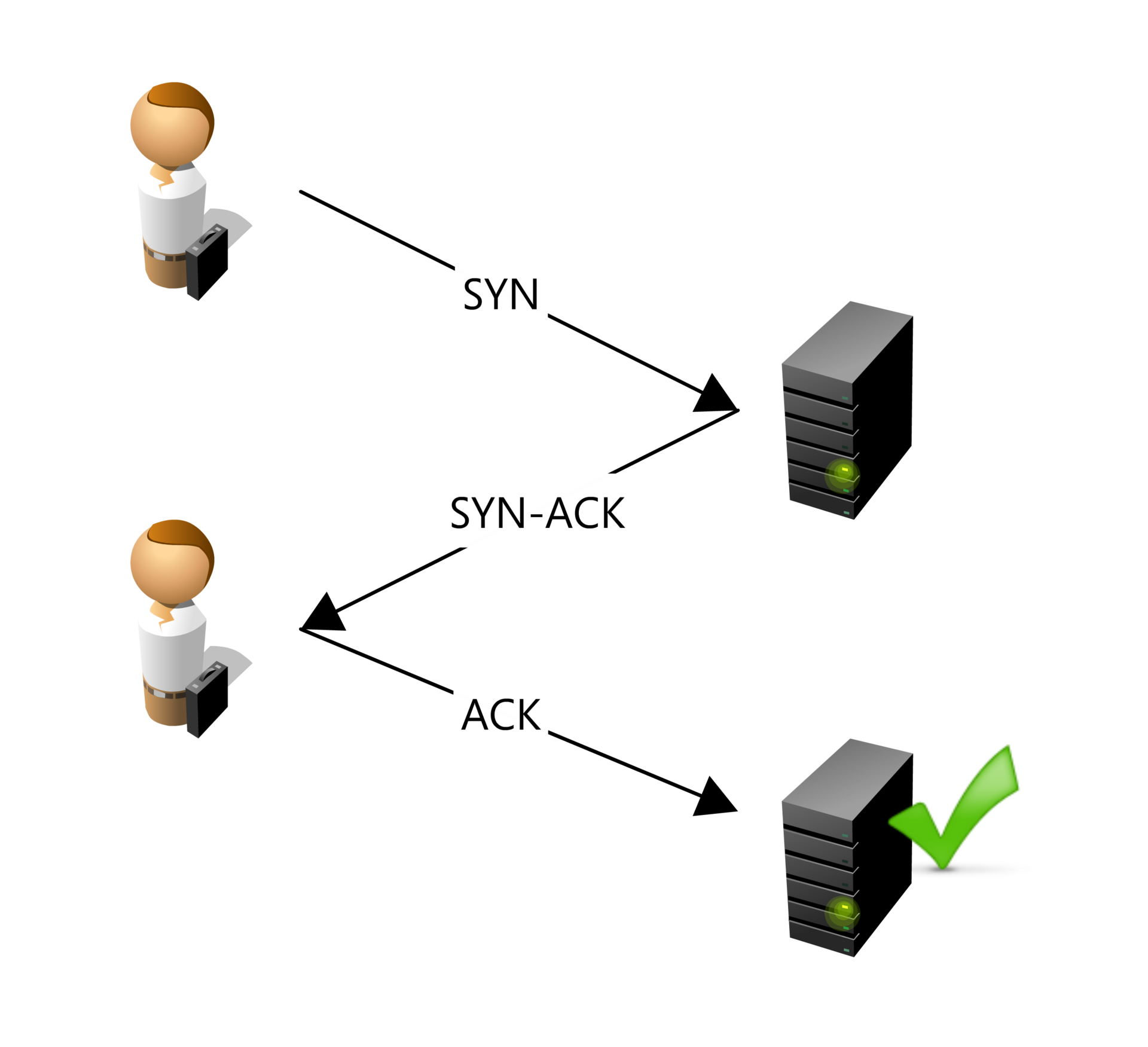
- SYN (Synchronize) Packet: The client sends a SYN packet to the server to initiate the connection and request synchronization.
- SYN-ACK (Synchronize-Acknowledge) Packet: The server responds with a SYN-ACK packet, acknowledging the receipt of the SYN packet and agreeing to establish a connection.
- ACK (Acknowledge) Packet: The client sends an ACK packet back to the server, confirming the receipt of the SYN-ACK packet. At this point, a TCP connection is established, allowing data to be transferred reliably between the client and server.
TCP ensures that data is sent and received in the correct order, resending any lost packets and managing flow control to match the network's capacity.
Once the TCP connection is established, the Transport Layer Security (TLS) protocol is used to secure the connection. The TLS handshake involves several steps to authenticate the server and establish a secure communication channel:
- ClientHello: The client sends a "ClientHello" message to the server, indicating the supported TLS versions, cipher suites, and a random number (Client Random).
- ServerHello: The server responds with a "ServerHello" message, selecting the TLS version and cipher suite from the client's list, and providing its digital certificate and a random number (Server Random).
- Certificate and Key Exchange: The server sends its digital certificate to the client for authentication. The client verifies the certificate against trusted certificate authorities.
- Premaster Secret: The client generates a premaster secret, encrypts it with the server's public key (from the certificate), and sends it to the server.
- Session Key Generation: Both the client and server use the premaster secret, along with the Client Random and Server Random, to generate a shared session key for symmetric encryption.
- Finished Messages: The client and server exchange messages encrypted with the session key to confirm that the handshake was successful and that both parties have the correct session key.
Once the TLS handshake is complete, the client and server have established a secure, encrypted connection. This ensures that any data exchanged is protected from eavesdropping and tampering by third parties.
TLS 1.3 vs TLS 1.2: Why It Matters for TTFB
The version of TLS your server uses has a direct impact on connection duration. TLS 1.3 is faster than TLS 1.2 because it reduces the number of round trips needed to complete the handshake:
| Feature | TLS 1.2 | TLS 1.3 |
|---|---|---|
| Handshake round trips | 2 round trips | 1 round trip |
| 0-RTT resumption | Not supported | Supported (for repeat visitors) |
| Cipher suites | Many (some weak) | 5 strong suites only |
| Forward secrecy | Optional | Required for all connections |
| Typical time saved | Baseline | 50 to 150ms faster per connection |
TLS 1.3 reduces the handshake from two round trips to one. For a user who is 100ms away from the server (round trip time), this saves approximately 100ms on every new connection. For repeat visitors, TLS 1.3's 0-RTT (zero round trip time) resumption allows the client to send encrypted data immediately upon reconnection by reusing previously exchanged session information. This can reduce the TLS handshake overhead to nearly zero for returning visitors.
HTTP/3 and QUIC: The Future of Fast Connections
HTTP/3 speeds up TLS connections by integrating with the QUIC protocol, which reduces the number of round trips needed to establish a secure connection by combining the handshake processes into one, and supports 0-RTT resumption for faster reconnections. Additionally, QUIC's use of UDP eliminates head-of-line blocking and improves congestion control, leading to more efficient data transmission and quicker page loads.
HTTP/3 brings several improvements over HTTP/2 that directly affect the connection duration:
- Combined handshake: With HTTP/2 over TCP, the TCP handshake and TLS handshake happen sequentially (3 round trips total for a new connection). HTTP/3 over QUIC combines the transport and TLS handshake into a single round trip. For new connections this saves an entire round trip compared to HTTP/2.
- 0-RTT connection resumption: Like TLS 1.3, QUIC supports 0-RTT resumption. Returning visitors can start sending data immediately without waiting for any handshake to complete. This is particularly effective for mobile users who frequently switch between Wi-Fi and cellular connections.
- No head-of-line blocking: With HTTP/2 over TCP, a single lost packet blocks all streams on that connection until the packet is retransmitted. QUIC uses UDP and handles streams independently, so a lost packet only affects the specific stream it belongs to. This results in more consistent connection performance on unreliable networks.
- Connection migration: QUIC connections are identified by a connection ID rather than a source IP and port. This means that when a mobile user moves from Wi-Fi to cellular (and their IP address changes), the QUIC connection survives without needing to re-establish. This avoids the full TCP + TLS handshake that would otherwise be required.
How Does the Connection Time Impact the Time to First Byte?
How to Minimize Connection Time Impact on the TTFB
Use Preconnect for Critical Origins
The <link rel="preconnect"> resource hint tells the browser to establish a connection (DNS + TCP + TLS) to a specified origin before any resources from that origin are actually needed. This eliminates the connection duration from the critical path when the resource is eventually requested:
<!-- Preconnect to critical third-party origins -->
<link rel="preconnect" href="https://fonts.googleapis.com">
<link rel="preconnect" href="https://fonts.gstatic.com" crossorigin>
<link rel="preconnect" href="https://cdn.example.com">
Use preconnect sparingly (3 to 5 origins maximum). Each preconnect opens a full TCP + TLS connection, which consumes CPU and network resources. Only preconnect to origins that are needed on every page load. For origins that are only occasionally needed, use dns-prefetch instead (see our DNS duration guide).
Server Configuration for TLS 1.3 and HTTP/3
- HTTP/3: brings the QUIC protocol over UDP instead of TCP, allowing for faster and more efficient data transfer.
- TLS 1.3: adds more security and reduces handshake round trips. Required for 0-RTT Connection resumption.
- 0-RTT Connection Resumption: TLS 1.3 feature that allows returning clients to send encrypted data immediately upon reconnection by reusing previously exchanged information.
- TCP Fast Open: enables data to be sent in the initial SYN packet, reducing the round-trip time for the TCP handshake.
- TLS False Start: allows early sending of data before the TLS handshake is complete.
- OCSP Stapling: speeds up certificate validation by eliminating the need for the client to contact the certificate authority directly.
Here is an example Nginx configuration that enables TLS 1.3 and OCSP Stapling:
server {
    listen 443 ssl http2;

    ssl_protocols TLSv1.2 TLSv1.3;
    ssl_prefer_server_ciphers off;

    # TLS 1.3 cipher suites
    ssl_ciphers TLS_AES_128_GCM_SHA256:TLS_AES_256_GCM_SHA384:TLS_CHACHA20_POLY1305_SHA256;

    # Enable OCSP Stapling
    ssl_stapling on;
    ssl_stapling_verify on;
    resolver 1.1.1.1 8.8.8.8 valid=300s;
    resolver_timeout 5s;

    # Enable session resumption (TLS session tickets)
    ssl_session_cache shared:SSL:10m;
    ssl_session_timeout 1d;
    ssl_session_tickets on;

    # ... rest of your server configuration
}
For Apache, enable TLS 1.3 with:
<VirtualHost *:443>
    SSLEngine on
    SSLProtocol -all +TLSv1.2 +TLSv1.3

    # Enable OCSP Stapling
    SSLUseStapling On
    SSLStaplingCache shmcb:/tmp/stapling_cache(128000)

    # Enable session resumption
    SSLSessionCache shmcb:/tmp/ssl_gcache_data(512000)
    SSLSessionCacheTimeout 300

    # ... rest of your virtual host configuration
</VirtualHost>
Time to First Byte TIP: not only does a CDN deliver shorter round trip times. Using a CDN will often immediately improve TCP and TLS connection times because premium CDN providers will have correctly configured these settings for you. See our guide on how to configure Cloudflare for performance to get started.
Measuring Connection Duration with JavaScript
You can measure the connection duration sub-part of the TTFB directly in the browser using the Navigation Timing API:
new PerformanceObserver((entryList) => {
  const [nav] = entryList.getEntriesByType('navigation');

  const tcpDuration = nav.connectEnd - nav.connectStart;
  const tlsDuration = nav.connectEnd - nav.secureConnectionStart;
  const totalConnection = tcpDuration;

  console.log('Connection Duration:', totalConnection.toFixed(0), 'ms');
  console.log('  TCP handshake:', (tcpDuration - tlsDuration).toFixed(0), 'ms');
  console.log('  TLS negotiation:', tlsDuration.toFixed(0), 'ms');

  if (nav.nextHopProtocol) {
    console.log('  Protocol:', nav.nextHopProtocol);
  }
}).observe({
  type: 'navigation',
  buffered: true
});
The nextHopProtocol property reveals which protocol was used for the connection. Common values are "h2" (HTTP/2), "h3" (HTTP/3), and "http/1.1". If your server supports HTTP/3 but your RUM data shows most connections using "h2," it may indicate that HTTP/3 support is not properly advertised via the Alt-Svc header.
How to Find TTFB Issues Caused by Slow Connection Time
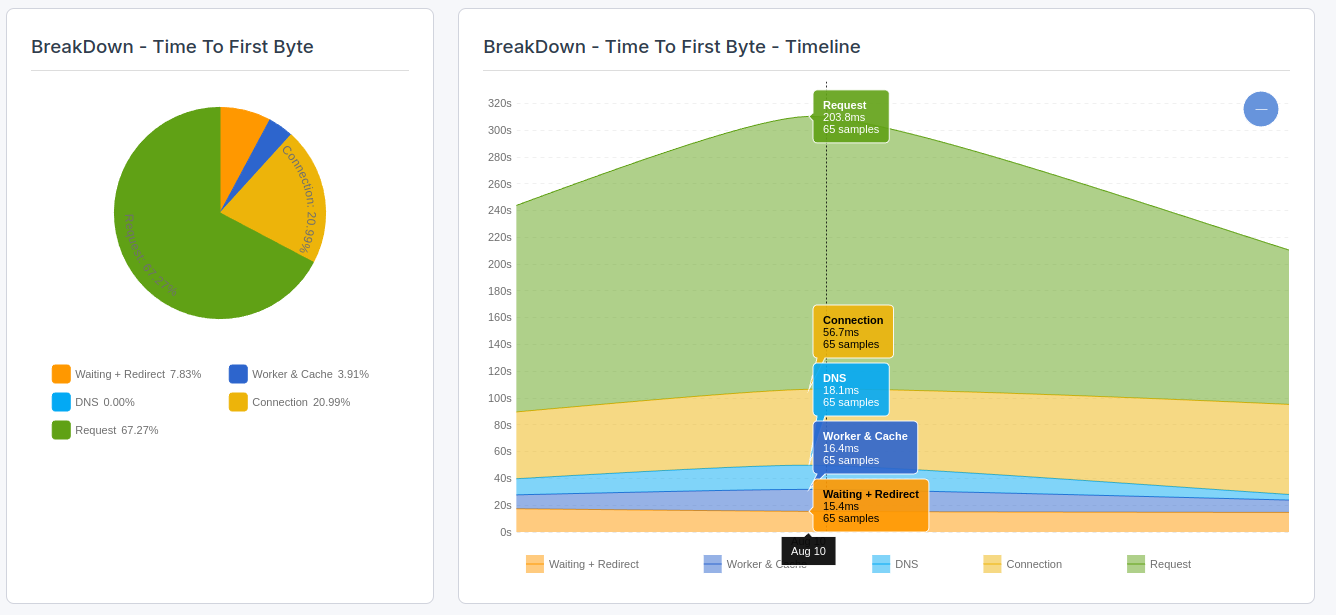
To find the impact that real users experience caused by connection latency, you will need to use a RUM tool like CoreDash. Real User Monitoring will let you track the Core Web Vitals in greater detail and without the 28-day Google delay.
In CoreDash, click on "Time to First Byte breakdown" to visualize the connection part of the Time to First Byte.
Further Reading: Optimization Guides
Related guides:
- 103 Early Hints: the server can send resource hints (preload, preconnect) while still processing the main response, allowing the browser to start establishing connections earlier.
- Configure Cloudflare for Performance: Cloudflare automatically enables HTTP/3, TLS 1.3, and OCSP Stapling. Using a CDN also brings your server closer to users, reducing round trip times for all connections.
TTFB Sub-parts: Complete Guides
The connection duration is one of five sub-parts of the TTFB. Explore the other sub-parts to understand the full picture:
- Fix and Identify TTFB Issues: the diagnostic starting point for all TTFB optimization.
- Waiting Duration: redirects, browser queuing, and HSTS optimization.
- Cache Duration: service worker performance, browser cache lookups, and bfcache.
- DNS Duration: DNS provider selection, TTL configuration, and dns-prefetch.
- Request Duration: server processing time, database queries, and backend optimization.
Find out what is actually slow.
I map your critical rendering path using real field data. You get a prioritized fix list, not a Lighthouse report.
Get the audit
