Reduce the Cache Duration Sub-part of the Time to First Byte
The cache duration measures service worker and browser cache lookup time. Learn caching strategies, Cache-Control headers, bfcache, and service worker optimization to reduce the TTFB

Reduce the Cache Duration of the Time to First Byte
This article is part of our Time to First Byte (TTFB) guide. The cache duration is the second sub-part of the TTFB and represents the time the browser spends checking its local cache and any active service workers for a matching response. While the cache duration is rarely the primary bottleneck, understanding it is important for sites that use service workers or rely heavily on browser caching strategies.
The Time to First Byte (TTFB) can be broken down into the following sub-parts:
- Waiting + Redirect (or waiting duration)
- Worker + Cache (or cache duration)
- DNS (or DNS duration)
- Connection (or connection duration)
- Request (or request duration)
Looking to optimize the Time to First Byte? This article covers the cache duration part of the Time to First Byte. If you are looking to understand or fix the Time to First Byte and do not know what the cache duration means, please read what is the Time to First Byte and fix and identify Time to First Byte issues before you start with this article.
Note: usually the Cache Duration part of the Time to First Byte is not a bottleneck. So continue reading if a) you are using a service worker, or b) you are a pagespeed enthusiast like me!
Usually the cache duration sub-part of the Time to First Byte is not a bottleneck and will happen within 10 to 20 ms. When using a service worker, an acceptable time is below 60ms.
Table of Contents!
- Reduce the Cache Duration of the Time to First Byte
- How Do Service Workers Affect the Time to First Byte?
- Service Worker Caching Strategies
- Cache-Control Header Configuration
- Back/Forward Cache (bfcache)
- How to Measure the Cache Duration Sub-part of the Time to First Byte
- How to Find TTFB Issues Caused by a High Cache Duration
- How to Minimize Service Worker Cache Time Impact
- Further Reading: Optimization Guides
- TTFB Sub-parts: Complete Guides
How Do Service Workers Affect the Time to First Byte?
Service workers can have both a positive and a negative impact on the Time to First Byte (TTFB), but only for websites that use Service Workers.
Here is how service workers affect TTFB:
Slow down the TTFB because of Service Worker Startup Time: The workerStart value represents the time it takes for a Service Worker to start up if one is present for the requested resource. This startup time is included in the TTFB calculation. If a Service Worker needs to be started or resumed from a terminated state, it can add a delay to the initial response time and increase the TTFB.
Speed up the TTFB by caching: By using a caching strategy like stale-while-revalidate, a service worker can serve content directly from the cache if available. This leads to a near-instant TTFB for frequently accessed resources, as the browser does not need to wait for a server response. This strategy works best for infrequently updated content rather than dynamically generated content that requires up-to-date information.
Speed up the TTFB with app-shell: For client-rendered applications, the app shell model (where a service worker delivers a basic page structure from the cache and dynamically loads content later) can reduce the TTFB for that base structure to almost zero.
Slow down the TTFB with unoptimized code: Complicated and inefficient service workers may slow down the cache lookup process and by doing so also slow down the TTFB.
Are service workers bad for pagespeed? No (usually) they are not bad at all. While Service Workers can initially increase TTFB due to startup time, their ability to intercept network requests, manage caching, and provide offline support can lead to serious performance improvements in the long run, especially for repeat visitors to a site.
Service Worker Caching Strategies
The caching strategy your service worker uses determines how it balances speed and freshness. Each strategy has different implications for the cache duration sub-part of the TTFB:
Cache-First (Cache Falling Back to Network)
The service worker checks the cache first. If a cached response exists, it is returned immediately. If not, the request goes to the network. This strategy delivers the fastest TTFB for cached resources but risks serving stale content.
Best for: static assets, images, fonts, and content that changes infrequently.
self.addEventListener('fetch', (event) => {
  event.respondWith(
    caches.match(event.request).then((cachedResponse) => {
      if (cachedResponse) {
        return cachedResponse;
      }
      return fetch(event.request).then((networkResponse) => {
        const cache = await caches.open('v1');
        cache.put(event.request, networkResponse.clone());
        return networkResponse;
      });
    })
  );
});
Network-First (Network Falling Back to Cache)
The service worker always tries the network first. If the network request fails (e.g., the user is offline), the cached version is served. This strategy ensures fresh content when the network is available but does not reduce the TTFB for online users.
Best for: API responses, frequently updated content, and pages where freshness is critical.
Stale-While-Revalidate
The service worker returns the cached version immediately (fast TTFB) while simultaneously fetching an updated version from the network in the background. The updated version replaces the cached copy for the next visit. This is often the best balance between speed and freshness.
Best for: content that changes regularly but does not require real time accuracy, such as news articles, blog posts, and product listings.
self.addEventListener('fetch', (event) => {
  event.respondWith(
    caches.open('v1').then((cache) => {
      return cache.match(event.request).then((cachedResponse) => {
        const fetchPromise = fetch(event.request).then((networkResponse) => {
          cache.put(event.request, networkResponse.clone());
          return networkResponse;
        });
        return cachedResponse || fetchPromise;
      });
    })
  );
});
Cache-Control Header Configuration
While the cache duration sub-part of the TTFB specifically measures the time spent in service worker and browser cache lookups, proper Cache-Control headers determine whether the browser needs to contact the server at all. Correct cache headers can effectively bypass the entire TTFB for returning visitors.
Here is a recommended Cache-Control configuration for different resource types:
# HTML pages (always revalidate)
Cache-Control: no-cache

# Static assets with content hashing (cache forever)
Cache-Control: public, max-age=31536000, immutable

# Images without content hashing (cache for 1 week)
Cache-Control: public, max-age=604800

# API responses (no caching)
Cache-Control: no-store
Key directives explained:
- no-cache: the browser must revalidate with the server before using a cached copy. This does not mean "do not cache"; it means "always check first."
- no-store: the browser must not cache the response at all. Use this for sensitive or highly dynamic content.
- max-age: the number of seconds the response can be served from cache without revalidation.
- immutable: tells the browser that the resource will never change. Combine this with content hashed filenames (e.g.,
style.a1b2c3.css) for static assets. - public: allows the response to be cached by shared caches (CDN, proxy). Use private for user specific content.
When using a CDN like Cloudflare, you can also configure edge caching rules. See our guide on how to configure Cloudflare for performance for detailed instructions.
Back/Forward Cache (bfcache)
The back/forward cache (bfcache) is a browser optimization that stores a complete snapshot of a page in memory when the user navigates away. When the user presses the back or forward button, the page is restored instantly from memory, completely eliminating the TTFB (and every other loading metric).
Pages served from bfcache show a TTFB of 0 milliseconds in RUM data because no network request is made at all. The browser simply restores the page from its in-memory snapshot.
To ensure your pages are eligible for bfcache:
- Do not use
unloadevent listeners (usepagehideinstead). - Do not use
Cache-Control: no-storeon the HTML document. - Close any open IndexedDB connections when the page is hidden.
- Do not hold active WebSocket or WebRTC connections (close them in the
pagehideevent).
You can test bfcache eligibility in Chrome DevTools under the Application tab, in the "Back/Forward Cache" section. Chrome will list any reasons why the page was not eligible for bfcache.
For sites with significant back/forward navigation patterns (e.g., e-commerce category and product pages, search result pages), bfcache can dramatically improve the perceived TTFB for a large portion of navigations.
How to Measure the Cache Duration Sub-part of the Time to First Byte
You can measure the cache duration sub-part of the Time to First Byte with this snippet:
new PerformanceObserver((entryList) => {
  const [navigationEntry] = entryList.getEntriesByType('navigation');

  // get the relevant timestamps
  const activationStart = navigationEntry.activationStart || 0;
  const waitEnd = Math.max(
    (navigationEntry.workerStart || navigationEntry.fetchStart) -
    activationStart,
    0,
  );
  const dnsStart = Math.max(
    navigationEntry.domainLookupStart - activationStart,
    0,
  );

  // calculate the cache duration
  const cacheDuration = dnsStart - waitEnd;

  // log the results
  console.log('%cTTFB cacheDuration', 'color: blue; font-weight: bold;');
  console.log(cacheDuration);

}).observe({
  type: 'navigation',
  buffered: true
});
How to Find TTFB Issues Caused by a High Cache Duration
To find the impact that real users experience caused by cache duration you will need to use a RUM tool like CoreDash. Real User Monitoring will let you track the Core Web Vitals in great detail.
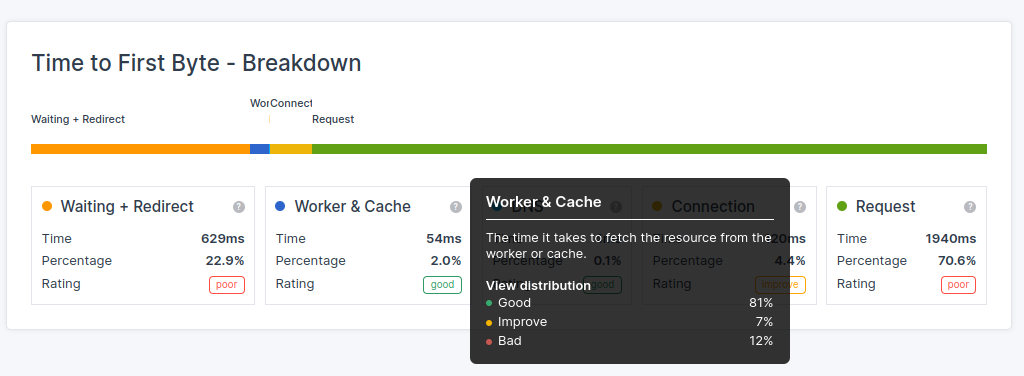
In CoreDash, simply navigate to "Time to First Byte" and view the breakdown details. This will show you the TTFB breakdown into all of its sub-parts and tell you exactly how long the cacheDuration takes for the 75th percentile.
How to Minimize Service Worker Cache Time Impact
To optimize TTFB when using Service Workers:
- Minimize the complexity of Service Worker scripts to reduce startup time.
- Implement efficient caching strategies within the Service Worker (prefer stale-while-revalidate for navigation requests).
- Consider pre-caching critical resources during Service Worker installation.
- Regularly monitor and analyze the impact of Service Workers on your site's TTFB.
- Use
navigation preloadto allow the network request to happen in parallel with the service worker startup. This prevents the service worker boot time from being added to the TTFB.
Enable navigation preload in your service worker with:
self.addEventListener('activate', (event) => {
  event.waitUntil(
    (async () => {
      if (self.registration.navigationPreload) {
        await self.registration.navigationPreload.enable();
      }
    })()
  );
});
Get the implementation right and service workers will speed up your site for repeat visitors. Get it wrong and every page load pays the boot cost.
Further Reading: Optimization Guides
Related guides:
- 103 Early Hints: start loading critical resources before the server response is ready, complementing your caching strategy.
- Configure Cloudflare for Performance: set up CDN edge caching, cache rules, and page rules to optimize your caching strategy at the edge level.
TTFB Sub-parts: Complete Guides
The cache duration is one of five sub-parts of the TTFB. Explore the other sub-parts to understand the full picture:
- Fix and Identify TTFB Issues: the diagnostic starting point for all TTFB optimization.
- Waiting Duration: redirects, browser queuing, and HSTS optimization.
- DNS Duration: DNS provider selection, TTL configuration, and dns-prefetch.
- Connection Duration: TCP handshake, TLS optimization, HTTP/3, and preconnect.
- Request Duration: server processing time, database queries, and backend optimization.
I write the code, not the report.
I join your team for 1 to 2 sprints. I set up the monitoring and make sure your team keeps the metrics green after I leave.
Get in touch
