Defer jQuery in WordPress
Learn how to defer jQuery in WordPress for extra pagespeed

Why defer jQuery?
jQuery still ships with every WordPress installation and most themes load it without deferring. That means it blocks HTML parsing on every single page load. Here is how to fix it.
Last reviewed by Arjen Karel on March 2026
jQuery appears on 74% of all web pages according to the 2024 Web Almanac, largely driven by WordPress. Yet only 47% of mobile pages use the defer attribute on any script. That means the majority of WordPress sites are still loading jQuery synchronously, blocking HTML parsing and delaying every paint metric on the page, especially the Largest Contentful Paint.
Take a look at the image below. It shows the difference in HTML parsing between normal, deferred and async scripts. If jQuery is not deferred the browser will block HTML parsing until the script has been executed. If jQuery is deferred the browser does not have to block the parser. And this will save you a whole lot of time. For a full comparison, see async vs defer and how this affects the Core Web Vitals.
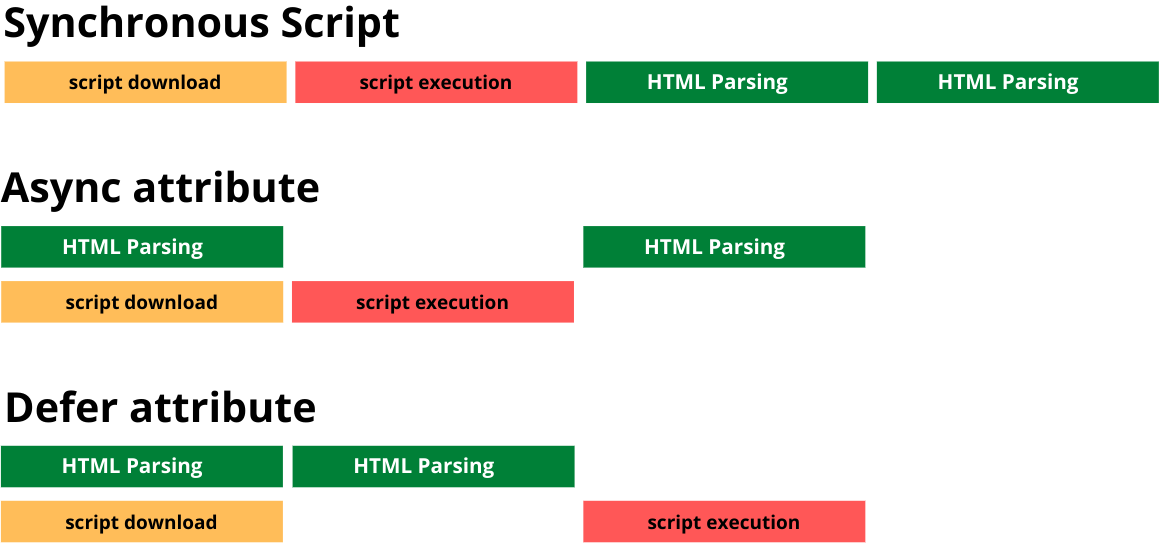
The reason that theme builders are not deferring jQuery by default is because of legacy. Some plugins add (inline) scripts that depend on jQuery. If jQuery is loaded deferred but the script that needs jQuery is not deferred there will be a conflict (and an error).
Method 1: Manually Defer jQuery
Step 1: Find where jQuery is enqueued
First, find where jQuery is included in your WordPress theme. It is usually in the theme's functions.php file or directly in the header.php file. Look for lines like:
wp_enqueue_script('jquery');
We now know that the handle for jQuery is called 'jquery'.
Step 2: Use a child theme
If you are modifying a parent theme, create a child theme first. Otherwise your changes will be overwritten on the next theme update.
Step 3: Enqueue jQuery with the 'defer' attribute
In your child theme's functions.php file add the following code and modify it to match your jQuery file location and handle. We are using the WordPress 6.3 defer strategy:
function defer_jquery() {
  if (!is_admin()) {
    wp_deregister_script('jquery');
    wp_register_script('jquery', '/js/jquery/jquery.js', [], null, [ 'strategy'  => 'defer']);
    wp_enqueue_script('jquery');
  }
}
add_action('wp_enqueue_scripts', 'defer_jquery',100);
Let's break it down:
wp_deregister_script('jquery'): Unregisters the default jQuery script.wp_register_script('jquery', '/js/jquery/jquery.js', [], null, [ 'strategy' => 'defer']);: Registers jQuery with the 'defer' strategy.wp_enqueue_script('jquery'): Enqueues the modified jQuery script.
Et voila: you have now successfully deferred jQuery on your WordPress site. And as a bonus you now know how to defer any script because the process is exactly the same! For more deferral techniques beyond WordPress, see 16 methods to defer JavaScript.
Watch out for inline scripts. WordPress 6.3 will silently remove the defer strategy if your script has inline scripts attached in the after position via wp_add_inline_script(). If you defer jQuery but it still loads synchronously, check whether any plugin is adding inline scripts to the jQuery handle.
Method 2: use a plugin
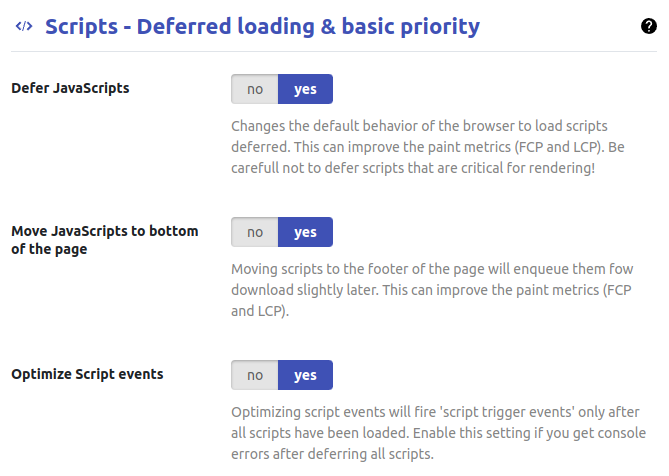
Plugins like WP Core Web Vitals make it super easy to defer jQuery and many plugins can even handle the complications that may arise from it by also deferring dependencies and performing a few other tricks like caching jQuery events until jQuery has been executed.
Method 3: CloudFlare
Another super simple way to defer jQuery is to use CloudFlare's Rocket Loader. Rocket Loader works by disabling all your scripts during page load and then quickly enabling them again. This trick mimics deferring scripts but it has a few drawbacks:
- CloudFlare Rocket Loader breaks a browser feature called the preload scanner. With Rocket Loader scripts are not preloaded and it might take a bit longer for your scripts to be downloaded and executed.
- CloudFlare Rocket Loader is a pretty blunt instrument. It does not discriminate between important, less important and nice to have scripts. It just defers everything without any consideration and leaves you with no control over script timing.
WordPress sites have a 45% Core Web Vitals pass rate on mobile according to the 2025 Web Almanac, with LCP being the weakest metric at only 53%. Render-blocking jQuery is one of the most common causes. Deferring it will not fix everything, but it removes one of the biggest blockers standing between your site and a passing LCP score.
Test your changes
After deferring jQuery, check your site. Open the browser console and look for errors. Click through your menus, sliders, forms, and anything that uses JavaScript. If something breaks, the troubleshooting section below will help you fix it.
Troubleshooting
If you run into any issues those will probably fall into one of 3 categories. Most issues can be found by opening the inspector and navigating to the console tab. If there are any issues you will likely find warnings that look something like this and read 'Uncaught ReferenceError: jQuery is not defined':
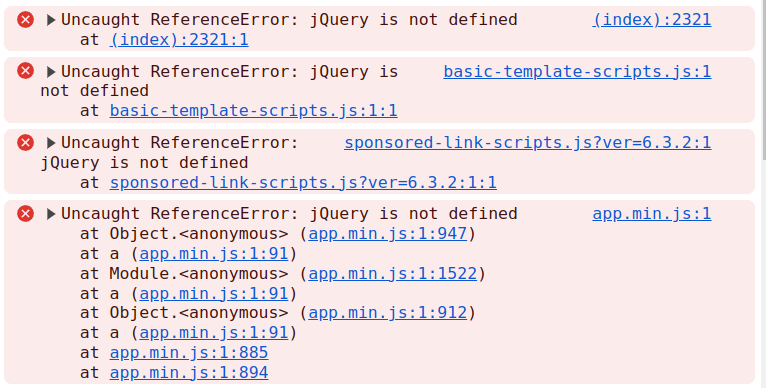
Fixing them is not that hard to do. Next to the error is a reference to the error origin. If it is (index) it most likely originates from an inline script. If it is another file it is either a timing issue or you forgot to defer that file as well.
Dependent scripts
Inline Scripts
$(function(){
 // do something
})
- Use the type="module" trick. The newer <script type="module"> will also defer inline JavaScript.
- Place inline scripts in an external file. If you need variables you can add those in an inline script directly on the page but the main jQuery dependent functions should be in an external file that is also deferred.
Timing issues
Another, less common issue originates from timing. If jQuery is not deferred it will execute before the DOMContentLoaded and load event. You can depend on this. If it is deferred a script might be executed after the DOMContentLoaded event. This means if you have attached an event handler on the DOMContentLoaded event, it will not reliably be executed. If you run into issues like these try changing the trigger or wrapping the function into jQuery().
Across WordPress sites monitored by CoreDash, sites that defer all scripts including jQuery have a p75 LCP of 2.1 seconds compared to 3.4 seconds on sites that load jQuery synchronously. That is a 38% improvement from a single configuration change. After deploying your changes, verify the improvement with Real User Monitoring. Lighthouse scores tell you if the defer attribute is working, but field data from real visitors tells you if your LCP actually improved. For more on how script placement affects the Core Web Vitals, see the Core Web Vitals WordPress guide. And as always, if you are stuck don't hesitate to contact me!
Performance degrades the moment you stop watching.
I set up the monitoring, the budgets, and the processes. That is the difference between a fix and a solution.
Let's talk
