Speed up Calendly integration
Embed Calendly without slowing down the Core Web Vitals

Speed up Calendly integration
Calendly is an awesome Online Appointment Scheduling Software! Calendly integrates with your work calendar and lets others schedule appointments with you directly. Many of my clients use Calendly and it works pretty well!
Last reviewed by Arjen Karel on March 2026
Integrating Calendly with your website
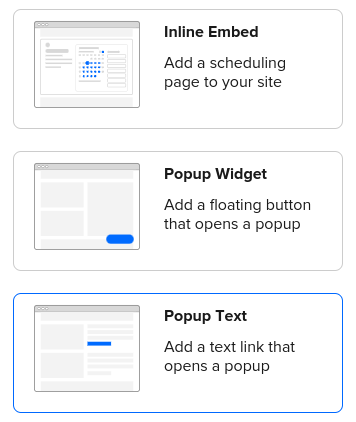
There are basically 3 ways of integrating Calendly to your website. Either via iframe, via a clickable link or via a button. The process is simple, just click on the embed code, select the code to copy and then paste that code into your website. Done, you have now embedded Calendly on your page. But it's not all rainbow and sunshine because you may have also slowed down your website.
How is Calendly slowing down your Core Web Vitals?
In inline embed Calendly adds an iframe to your site. If done correctly the paint metrics (Largest Contentful Paint and First Contentful Paint) will not be affected too much by integrating Calendly as an iframe. The iframe will affect the Interaction to Next Paint slightly but for most use cases it will be acceptable.
The "problem" with the Core Web Vitals occurs when you either add Calendly through a Popup widget or a Popup text. The code that is presented to you will have you add a stylesheet (https://assets.calendly.com/assets/external/widget.css) and a script (https://assets.calendly.com/assets/external/widget.js) to your site.
<!-- Calendly badge widget begin -->
<link
 href="https://assets.calendly.com/assets/external/widget.css"
 rel="stylesheet">
<script
  src="https://assets.calendly.com/assets/external/widget.js"
  type="text/javascript"
  async>
</script>
<a href="#"
   onclick="Calendly.initPopupWidget(
      {url: 'https://calendly.com/corewebvitals/pre-audit-meet'});
   return false;">
   Schedule time with me
</a>
<!-- Calendly badge widget end -->
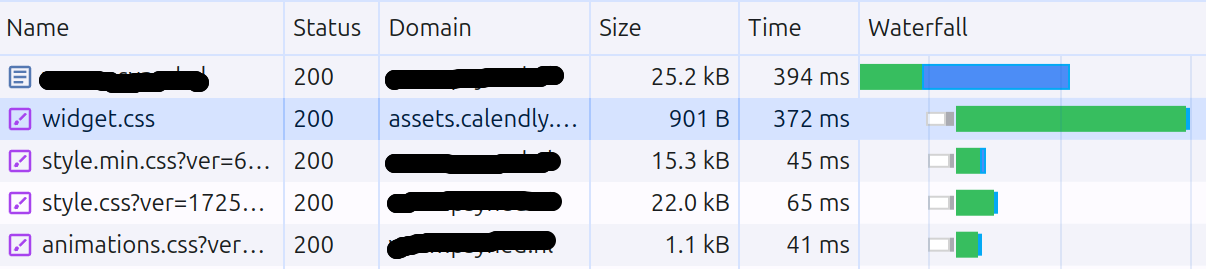
The result is a whopping 370ms delay caused by the Calendly stylesheet. DebugBear's audit of Calendly found the widget CSS is 464KB, largely due to embedded Base64 fonts. This happens because stylesheets in the head of the page are render blocking by default. That makes sense because without the styles the browser will not know what the final HTML should look like. That is why it is so important to have optimized stylesheets when working on the Core Web Vitals.
The async script will also compete for early resources but since that script is asynchronous the delay it causes is much less than the delay caused by the stylesheet.
The solution
The solution lies within "making Calendly non-render-blocking" and as a bonus "improve the timing". There is an easy and a slightly harder (and better) way to do this. Let's get started!
The easy fix
The easiest way would be to just make the stylesheet non-render-blocking by using the "preload trick". Just look at the changes I made to the code in bold. The stylesheet is now preloaded (and preloaded resources get downloaded in parallel). Then, when the stylesheet has loaded the preload link is transformed into a stylesheet link which effectively injects a stylesheet that is not render blocking!
<!-- Calendly badge widget begin -->
<link
 href="https://assets.calendly.com/assets/external/widget.css"
 rel="preload"
 as="style"
 onload="this.rel='stylesheet';this.onload=null;"
>
<script
  src="https://assets.calendly.com/assets/external/widget.js"
  type="text/javascript"
  async>
</script>
<a href="#"
   onclick="Calendly.initPopupWidget(
      {url: 'https://calendly.com/corewebvitals/pre-audit-meet'});
   return false;">
   Schedule time with me
</a>
<!-- Calendly badge widget end -->
The better fix
While the easy fix will definitely improve your paint metrics I still do not like the Calendly timing. No one in the history of the internet has ever been annoyed that we could not schedule an appointment within the first 100ms of pageload. I prefer to prioritize the more important elements of the page like the LCP element and critical scripts that for example handle menu interaction. This is the same facade pattern I use for chat widgets.
So let's take that knowledge and start loading both the script and the style when the page HTML has been parsed. This event is called DOMContentLoaded. When this event is broadcasted we use that time to load the style and the script asynchronously. When both the style and the script have been loaded we create a clickable link (in the callback function) that shows the popup when that link is clicked. Cool right? For more techniques like this, see 16 methods to defer JavaScript.
The code also uses scheduler.yield() to yield to the main thread before opening the popup. This keeps the interaction responsive and avoids blocking the browser while Calendly initializes.
document.addEventListener('DOMContentLoaded', function () {

    var stylesheetPromise = new Promise(function (resolve, reject) {
        var stylesheet = document.createElement('link');
        stylesheet.rel = 'stylesheet';
        stylesheet.href = 'https://assets.calendly.com/assets/external/widget.css';
        stylesheet.onload = resolve;
        stylesheet.onerror = reject;
        document.head.appendChild(stylesheet);
    });

    var scriptPromise = new Promise(function (resolve, reject) {
        var script = document.createElement('script');
        script.src = 'https://assets.calendly.com/assets/external/widget.js';
        script.onload = resolve;
        script.onerror = reject;
        document.head.appendChild(script);
    });

    async function yieldToMainThread() {
        if ('scheduler' in window && 'yield' in window.scheduler) {
          return await window.scheduler.yield();
        }
        return new Promise((resolve) => {
          setTimeout(resolve, 0);
        });
      }

    Promise.all([stylesheetPromise, scriptPromise])
        .then(function () {
            const clickEl = document.getElementById('demo');
            clickEl.innerHTML = '<a>Book a Demo</a>';
            document.getElementById('demo').addEventListener('click', async function () {
                this.innerHTML = 'Loading...';
                await yieldToMainThread();
                Calendly.initPopupWidget({ url: 'https://calendly.com/corewebvitals/pre-audit-meet' }); return false;
            });
        })
        .catch(function (error) {
            console.error('Error loading resources:', error);
        });
});
Demo
Check out the demo here by clicking on the link below (and if you need an audit feel free to make an appointment)
I write the code, not the report.
I join your team for 1 to 2 sprints. I set up the monitoring and make sure your team keeps the metrics green after I leave.
Get in touch
