Measure Core Web Vitals in Next.js: RUM Setup Guide
Set up Real User Monitoring for Core Web Vitals in Next.js (App Router and Pages Router)

Measure the Core Web Vitals in Next.js
Next.js is a JavaScript framework on top of React that enables you to build superfast and extremely user-friendly websites. That is true, Next.js is pretty fast and has a lot of features built in to ensure it stays fast. At least, in theory. Over time, as your website grows and more features get added and maybe when not all best practices are followed, Next.js pages will become slower and slower. That is probably why you are visiting this page :-)
Last reviewed by Arjen Karel on March 2026
To measure and prevent slow pages it is important to measure the Core Web Vitals and take action when a metric is below its threshold. The three Core Web Vitals are Largest Contentful Paint (LCP) for loading (threshold: 2.5 seconds), Interaction to Next Paint (INP) for interactivity (threshold: 200ms), and Cumulative Layout Shift (CLS) for visual stability (threshold: 0.1). Only 48% of mobile origins pass all three according to the 2025 Web Almanac. For Next.js sites specifically, the 2023 Astro framework report found only about 25% of Next.js origins passed. Server Components and the App Router in Next.js 14 and 15 have improved this, but measuring your own field data is the only way to know where you stand.
Forget about Lighthouse (sort of)
Lighthouse is a testing tool for the Core Web Vitals. Almost every client that I work for will, at some point, start talking about their Lighthouse scores and how they do not match up with their Search Console scores. The first thing I tell them is this: forget about Lighthouse. I will explain:
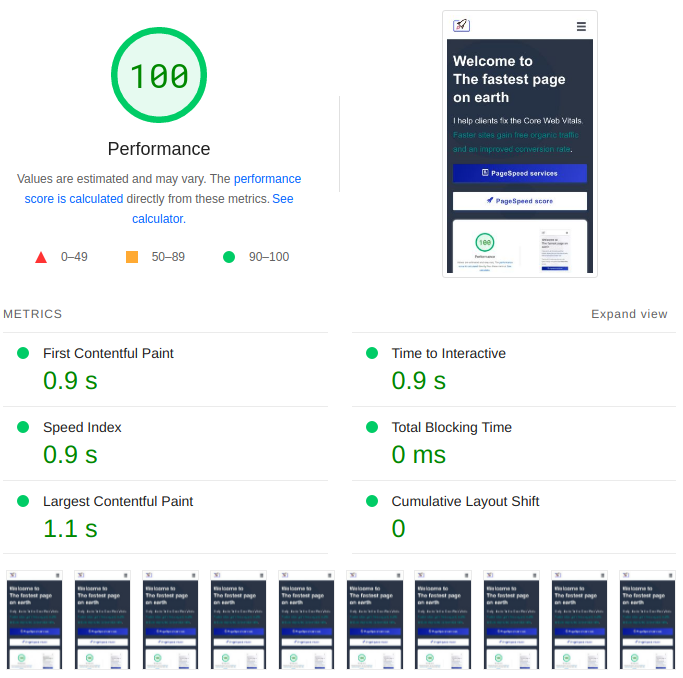
Lighthouse is a very useful tool that gathers 'lab data' for a non-cached first time visit under regulated conditions. Unfortunately the data gathered does not necessarily reflect the field data. Field data is collected by the browser every time a user loads one of your pages. That data is then sent to Google and used for determining your actual Core Web Vitals scores. This process is also called Real User Monitoring (RUM).
Here is the thing most developers miss: INP cannot be measured in lab tools at all. Lighthouse does not interact with your website, so it has no interaction data. It uses Total Blocking Time as a proxy, but TBT and INP are not the same thing. CLS in lab tools also shows artificially low scores because Lighthouse does not scroll or click around the page. The only way to get real INP and CLS numbers is from real users.
Do not get me wrong: I love Lighthouse. It is a masterful piece of software and it will give you great suggestions that you should probably implement. What I am saying is that the RUM metrics on a Next.js site are not merely made up out of first time, uncached views. No, the Core Web Vitals on a Next.js website are more complicated. That is why one of the first things I implement for my clients is real-time Real User Monitoring. Google ranks on CrUX field data, not Lighthouse scores.
Measure Core Web Vitals in Next.js (App Router)
If you are using the App Router (Next.js 13+), the recommended way to collect Core Web Vitals is the useReportWebVitals hook from next/web-vitals. This hook ships with Next.js itself, so there is nothing extra to install.
Because the hook requires the 'use client' directive, the best practice is to isolate it in a small component. This keeps the client boundary tight and avoids making your entire layout a client component:
// app/_components/web-vitals.js
'use client'
import { useReportWebVitals } from 'next/web-vitals'

export function WebVitals() {
  useReportWebVitals((metric) => {
    console.log(metric)
  })
  return null
}
Then import it in your root layout:
// app/layout.js
import { WebVitals } from './_components/web-vitals'

export default function Layout({ children }) {
  return (
    <html>
      <body>
        <WebVitals />
        {children}
      </body>
    </html>
  )
}
That is it. Every page load will now report LCP, INP, CLS, FCP, and TTFB to the console. Of course, logging to the console is not very useful in production. Let me show you how to send the data somewhere useful.
Send Core Web Vitals to a custom endpoint
The most reliable way to send performance data is navigator.sendBeacon(). It is designed for exactly this: sending small payloads when the user navigates away from the page, without blocking the navigation.
// app/_components/web-vitals.js
'use client'
import { useReportWebVitals } from 'next/web-vitals'

export function WebVitals() {
  useReportWebVitals((metric) => {
    const url = 'https://example.com/analytics'
    const body = JSON.stringify(metric)
    if (navigator.sendBeacon) {
      navigator.sendBeacon(url, body)
    } else {
      fetch(url, { body: body, method: 'POST', keepalive: true })
    }
  })
  return null
}
Send Core Web Vitals to Google Analytics (GA4)
If you use Google Analytics 4 with the gtag snippet, you can send Core Web Vitals as custom events:
// app/_components/web-vitals.js
'use client'
import { useReportWebVitals } from 'next/web-vitals'

export function WebVitals() {
  useReportWebVitals((metric) => {
    window.gtag('event', metric.name, {
      event_category: 'Web Vitals',
      value: Math.round(metric.name === 'CLS' ? metric.value * 1000 : metric.value),
      event_label: metric.id,
      non_interaction: true,
    })
  })
  return null
}
Remember: when reading the Core Web Vitals data from any RUM source, you need to use the 75th percentile. That is the threshold Google uses. Not the average, not the median. The p75.
Sampling on high-traffic sites
On high traffic websites it will make little sense to collect data from every user. You can sample 50% or less like this:
// app/_components/web-vitals.js
'use client'
import { useReportWebVitals } from 'next/web-vitals'

const inSample = Math.random() >= 0.5

export function WebVitals() {
  useReportWebVitals((metric) => {
    if (inSample) {
      const body = JSON.stringify(metric)
      navigator.sendBeacon('/analytics', body)
    }
  })
  return null
}
Measure Core Web Vitals in Next.js (Pages Router)
If you are still on the Pages Router, Next.js provides a built-in reportWebVitals function that you export from pages/_app.js. This is the older approach but it still works:
// pages/_app.js
export function reportWebVitals(metric) {
  if (metric.label === 'web-vital') {
    console.log(metric)
  }
}

export default function App({ Component, pageProps }) {
  return <Component {...pageProps} />
}
The same patterns for sending data to a custom endpoint or Google Analytics apply here. Just put the sendBeacon or gtag call inside the reportWebVitals function instead of the hook callback.
One thing to note: the Pages Router also reports Next.js custom metrics like Next.js-hydration and Next.js-route-change-to-render. These tell you how long hydration and client-side navigations take. The App Router version does not report these custom metrics yet.
Third party monitoring tools
There are a few third party tools that collect Core Web Vitals in Next.js. Vercel has @vercel/speed-insights which works out of the box if you deploy on Vercel. It is fine for a quick overview but it does not break metrics into sub-parts, the dashboards are basic, and you are locked into the Vercel ecosystem.
NewRelic and Sentry both collect Core Web Vitals but they are not performance tools. They are error tracking and APM tools that bolted on Core Web Vitals as a feature. Both inject scripts that compete for early network resources and main thread time. I have seen Sentry add 200ms of blocking time on mobile. That is ironic for a tool that is supposed to help you monitor performance.
CoreDash is what I use and recommend. It is built specifically for Core Web Vitals. Every metric is broken into sub-parts so you know exactly where the time goes. The dashboards show you trends, regressions, and page-level breakdowns without clicking through five menus. And the MCP integration lets you plug your field data into AI tools and ask questions about your performance in plain language. Just ask "what is causing layout shifts on mobile" and get the answer from your own data.
If you want to fix third party script issues or remove render-blocking CSS in Next.js, I have written dedicated guides for those as well.
I write the code, not the report.
I join your team for 1 to 2 sprints. I set up the monitoring and make sure your team keeps the metrics green after I leave.
Get in touch
