103 Early Hints: Preload Critical Resources During Server Think Time
Use server think time to preload your LCP image and critical CSS before the page is ready

103 Early Hints in short
103 Early Hints is a lightweight HTTP status code that the server sends before the final response. While the server is still processing your page, the browser can already start fetching critical resources like your LCP image or main stylesheet.
In my tests, an LCP image appeared 35% faster with 103 Early Hints. The improvement was even greater when the header also included stylesheets.
Last reviewed by Arjen Karel on March 2026
What are 103 Early Hints?
Early Hints is an HTTP status code (103) sent before the web server sends the final response. It allows the server to tell the browser, early in the loading process, that certain resources like an image or a stylesheet are critical to rendering the page.
Most dynamic pages take time to generate. The server queries a database, runs application logic, and assembles the HTML. During that processing time the browser just waits. 103 Early Hints fill that gap by telling the browser what to fetch while it waits for the real response.
Early Hints replace the deprecated HTTP/2 Server Push, which Chrome removed in version 106. Server Push bundled resources with the final response and frequently pushed bytes the browser already had cached. Early Hints avoid that problem because they only hint; the browser decides whether to act on them.
Browser support
103 Early Hints is supported by 93% of browsers globally:
- Chrome 103+ and Edge 103+: full support for preconnect and preload (since June 2022)
- Firefox 123+: full support for preconnect and preload (since February 2024)
- Safari 17+: preconnect only. Safari does not support preload in 103 responses
The Safari limitation matters. If your Early Hints strategy relies entirely on preloading images or fonts, Safari users will not benefit. Include preconnect hints alongside preload hints so that Safari at least warms up the connection to your resource origins.
Early Hints only work over HTTP/2 or HTTP/3. They do not work over HTTP/1.1, from iframes, or for non-navigation requests. The browser processes hints for preload and preconnect only; dns-prefetch and prefetch are not supported in 103 responses.
What do 103 Early Hints look like?
When a browser requests a page, the server immediately returns a 103 response before it has finished generating the HTML. This response tells the browser to start fetching the LCP image and stylesheet:
HTTP/2 103 Early Hints
Link: </image.webp>; rel=preload; as=image
Link: </style.css>; rel=preload; as=style
In the meantime, the server generates the page. Once ready, it sends the final response:
HTTP/2 200 OK
Content-Length: 1234
[the rest of the response]
By the time the browser receives the 200 response, it has already started downloading the image and stylesheet. That head start is what makes the Largest Contentful Paint faster.
How to send 103 Early Hints
You have three main options, from easiest to most control.
Cloudflare (easiest)
If you already use Cloudflare for performance, enabling Early Hints is a single toggle. Navigate to Speed > Settings > Content Optimization and turn on Early Hints. It is available on all plans, including the free tier.
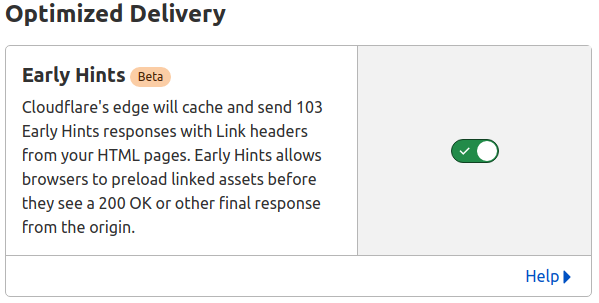
Cloudflare caches the Link headers from your origin's 200 responses. On subsequent requests, it sends those cached headers as a 103 response before forwarding the request to your origin. You provide the hints by sending Link headers from your application:
header("Link: </image.webp>; rel=preload; as=image", false);
header("Link: </style.css>; rel=preload; as=style", false);
NGINX (native since 1.29.0)
NGINX added native 103 Early Hints support in version 1.29.0 (June 2025). The early_hints directive forwards 103 responses from your backend to the client:
map $http_sec_fetch_mode $early_hints {
    navigate $http2$http3;
}

server {
    location / {
        early_hints $early_hints;
        proxy_pass http://backend.example.com;
    }
}
The sec-fetch-mode map ensures hints are only sent for navigation requests over HTTP/2 or HTTP/3. Your backend application must generate the 103 response; NGINX passes it through.
Apache (2.4.58+)
Apache can generate 103 responses itself using mod_http2. Enable it with the H2EarlyHints directive and define the resources to hint:
H2EarlyHints on
H2EarlyHint Link "</style.css>;rel=preload;as=style"
H2EarlyHint Link "</image.webp>;rel=preload;as=image"
Unlike NGINX, Apache generates the 103 response at the server level without needing your application to produce it.
When Early Hints help (and when they do not)
103 Early Hints are most effective when your server takes noticeable time to respond: dynamic pages that query databases, call APIs, or render templates. The slower the Time to First Byte, the more time the browser has to act on the hints.
Early Hints provide less benefit when:
- Your server responds in under 100ms. If TTFB is already fast, there is no gap for the browser to fill. Focus on resource prioritization in your HTML instead.
- Pages are served from cache. A fully cached HTML response loads so quickly that the 103 response barely has a head start.
- You hint too many resources. Hinting 10+ resources saturates the connection and can slow things down. Shopify found that on mobile devices, aggressive hinting led to performance degradation across TTFB, FCP, and LCP. Stick to 2 to 4 critical resources.
Despite 93% browser support, adoption remains low. According to the 2025 Web Almanac, only about 5% of top sites use 103 Early Hints. The main barrier is knowing which resources to hint for each page, something most CMSs do not handle automatically.
How to verify Early Hints are working
Open Chrome DevTools, go to the Network panel, and reload the page. Click on the document request and check the response headers. If Early Hints are working, you will see a 103 status before the 200 in the timing breakdown.
From the command line, you can verify with curl:
curl -v --http2 https://example.com 2>&1 | grep "< HTTP"
You should see both a 103 and a 200 response.
Test results
I tested two scenarios to measure the impact on First Contentful Paint and Largest Contentful Paint.
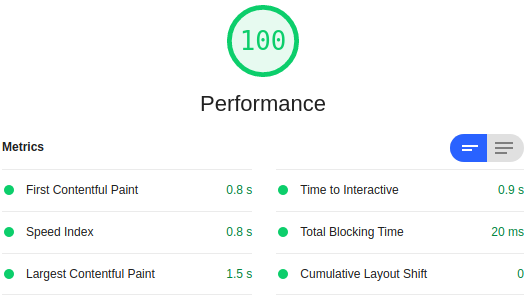
1. Early Hints on the LCP image only
The LCP image appeared on screen 35% earlier with 103 Early Hints compared to a regular preload in the HTML.
HTTP/2 103 Early Hints
Link: </image.webp>; rel=preload; as=image
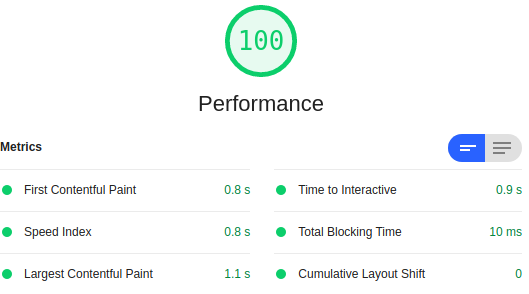
2. Early Hints with a large stylesheet and the LCP image
Adding an 85kb CSS file to the hints made the difference even more noticeable. FCP improved from 1.8 seconds to 1.4 seconds, and LCP improved from 3.2 seconds to 2.0 seconds.
HTTP/2 103 Early Hints
Link: </image.webp>; rel=preload; as=image
Link: </style.css>; rel=preload; as=style
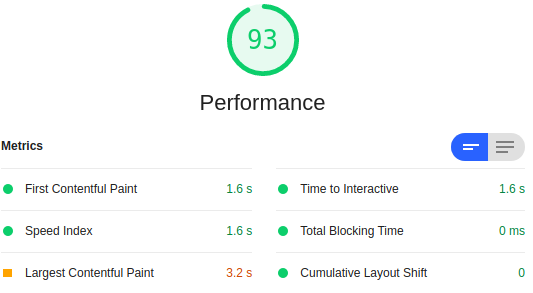
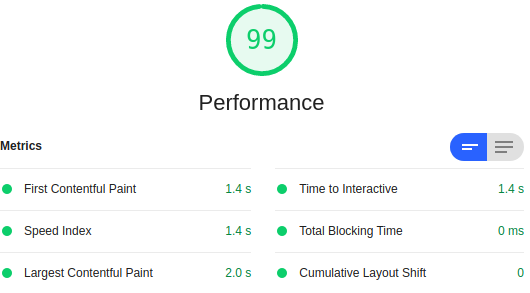
These numbers align with what Cloudflare measured across 100,000+ customers: an LCP improvement of 6% at the 50th percentile and 16% at the 75th percentile on desktop. Shopify saw a 500ms LCP improvement at p50 during Black Friday and Cyber Monday. The biggest gains come on pages with slow server response times, which is exactly when Early Hints have the most time to work.
Early Hints and TTFB
There is a measurement nuance to be aware of. Since Chrome 133, the browser's responseStart timing (used by most tools to report TTFB) includes the 103 response. This means your reported TTFB will drop after enabling Early Hints, even though your server's actual processing time has not changed.
If you need to measure server processing time separately, Chrome 133 introduced a new firstResponseHeadersStart timestamp that reports when the final 200 response headers arrive. Real User Monitoring tools that track both values give you the full picture: how much time Early Hints saved the browser, and how long your server actually took to respond.
Search Console flagged your site?
I deliver a prioritized fix list backed by field data. Not a 50 page PDF.
Request audit
