How to Yield to the Main Thread to Improve INP
Use scheduler.yield() to break up long tasks and keep your pages responsive

Yield to the main thread
Imagine a romantic movie. The setting is a small French marketplace in the center of a small village. The streets are filled with couples drinking coffee, eating croissants and buying flowers. Now imagine what happens when only one buyer can purchase something from a seller simultaneously while all others have to wait their turn. The baker gets swamped with requests, arguments break out at the florist and the romantic stroll turns into a frustrating wait.
Well ... that's kind of what happens on a website when things get too busy.
Last reviewed by Arjen Karel on March 2026
Why yielding matters for INP
The main thread of a browser handles all the important processes: parsing HTML and CSS, executing JavaScript, handling input events like clicks and scrolls, and visual rendering. It runs on a single-threaded model, which means it can only perform one task at a time. When a task starts to run, the browser will run it to completion and will not stop until it is done. No other task gets scheduled until the current one finishes. This is called blocking the main thread.
Blocking the main thread is the primary cause of poor Interaction to Next Paint (INP) scores. When a visitor clicks a button and your JavaScript blocks the main thread for 200ms, the browser cannot paint a response until the script finishes. The processing time phase of INP measures exactly this delay. According to the 2025 Web Almanac, the median mobile Total Blocking Time is 1,916ms, up 58% from the previous year. That is nearly 2 seconds where the browser cannot respond to user input.
One way to fix this is by yielding to the main thread. Yielding is a technique where long tasks are broken into multiple smaller tasks to allow the browser to handle more important work (like responding to user input) between them.
Long tasks and blocking period: When a task takes longer than 50 milliseconds, it is classified as a long task, and anything beyond that 50 millisecond threshold is known as the task's "blocking period". Breaking up these long tasks into smaller chunks allows the browser to remain responsive, even when handling computationally intensive operations.
Old yielding strategies
Before the Prioritized Task Scheduling API there were 4 ways to yield to the main thread. All have limitations.
- setTimeout(): The most common strategy.
setTimeout()with a delay of 0 adds the task to the end of the queue, allowing other tasks to run first. The problem: tasks can only be pushed to the end of the queue, so other scripts can cut in line before your code resumes. NestedsetTimeout()calls also impose a minimum 5ms delay after five rounds. - requestAnimationFrame(): Queues a function to execute before the browser's next repaint. Often combined with
setTimeout()to ensure callbacks get scheduled after the next layout update. Not designed for yielding; designed for animation work. - requestIdleCallback(): Best suited for non-critical, low-priority tasks that can run during the browser's downtime. The limitation: there is no guarantee that scheduled tasks will run promptly (or at all) on a busy main thread.
- isInputPending(): Checks for pending user inputs and yields only if an input is detected. Google no longer recommends this approach. It can return false negatives and does not account for other performance-critical work like animations and rendering updates.
scheduler.yield()
The limitations of these methods have been a concern for the Chrome team, especially with many sites failing INP. To address this, they built scheduler.yield(): a new API that lets developers yield to the main thread immediately without rearranging task order or adding complexity.
scheduler.yield() shipped stable in Chrome 129 (September 2024) and is now supported by all major browsers except Safari.
Code example
Since Safari does not yet support scheduler.yield(), use a fallback to setTimeout():
function yieldToMain() {
  if ('scheduler' in window && 'yield' in window.scheduler) {
    return window.scheduler.yield();
  }
  return new Promise((resolve) => {
    setTimeout(resolve, 0);
  });
}
The yieldToMain() function checks whether window.scheduler.yield exists. If it does, it uses the native API. If not, the code falls back to setTimeout(). This matches the pattern recommended by Google.
For projects that need the full Prioritized Task Scheduling API (including scheduler.postTask() and TaskController), Google Chrome Labs maintains an official polyfill.
Real life example: enhancing search with yieldToMain()
Here is how yieldToMain() can improve the search experience for your users.
The handleSearch() function first updates the button content to give immediate feedback that a search is in progress, then yields to allow the browser to paint that update. Next, fetchData() retrieves search data and updateHTML(data) displays the results. Another yieldToMain() ensures a quick layout update. Finally, less important tasks are scheduled during browser idle time. Note that I did not yield before requestIdleCallback() since it only runs when the main thread is idle anyway.
async function handleSearch() {
  /* quickly update the button content after submitting */
  updateButtonToPending();

  /* Yield to Main */
  await yieldToMain();

  /* fetch data and update html */
  const data = await fetchData();
  updateHTML(data);

  /* Yield to Main again */
  await yieldToMain();

  /* some functions should only run during browser idle time */
  requestIdleCallback(sendDataToAnalytics);
}
For another practical example, see how to use this same yield pattern with dataLayer pushes to prevent analytics scripts from blocking interactions.
Why scheduler.yield() is better
Unlike setTimeout(), which adds deferred tasks to the end of the task queue, scheduler.yield() pauses execution and places the continuation at the front of the queue. Your code resumes as soon as higher-priority work (like handling input callbacks) has completed. This is the key difference: you can yield to the main thread without the risk of other scripts cutting in line before your code resumes.
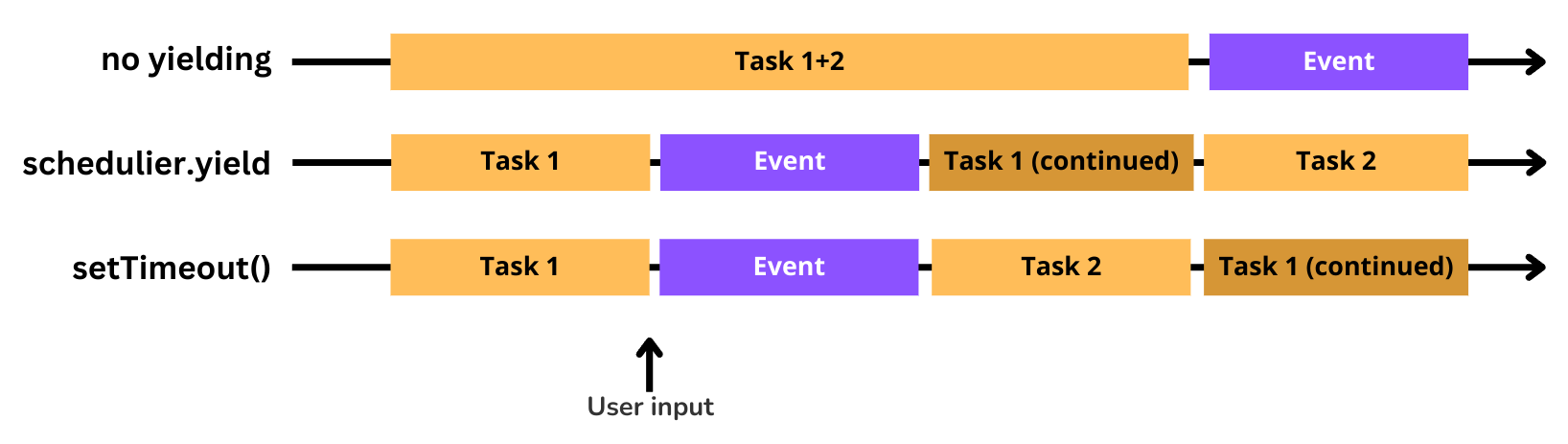
scheduler.yield() is also designed to work with the Prioritized Task Scheduling API. When called inside a scheduler.postTask() callback, scheduler.yield() inherits the task's priority level. This combination gives you fine-grained control over how your JavaScript is prioritized and when it yields.
Browser support
scheduler.yield() is supported by 71.5% of browsers globally:
- Chrome 129+ and Edge 129+: stable since September 2024
- Firefox 142+: stable since August 2025
- Safari: not supported, no announced timeline
The setTimeout() fallback in the yieldToMain() function above ensures your code works in all browsers. Safari users get the older behavior where continuations go to the back of the queue, but the page still yields. As browser support grows, more users will automatically get the faster resumption.
If the problem is third-party scripts blocking the main thread entirely, deferring those scripts is a better first step than yielding. Yielding helps when your own code needs to do a lot of work but you want the browser to stay responsive between chunks.
To verify that yielding is improving your INP in the field, monitor your pages with Real User Monitoring. Lab tools like Lighthouse measure Total Blocking Time, but only field data shows you the actual INP your visitors experience.
Your Lighthouse score is not the full picture.
Your real users are on Android phones over 4G. I analyze what they actually experience.
Analyze field data
