Scheduling dataLayer Events to optimize the INP
How deferring GTM events until after browser paint improves your INP scores

TL;DR: Improving INP by Deferring dataLayer.push()
When dataLayer.push() fires synchronously inside an event handler, GTM processes tags before the browser can paint visual feedback. This blocks the main thread and inflates your Interaction to Next Paint (INP). The fix: schedule dataLayer.push() to run after the browser has painted the next frame using requestAnimationFrame. This pattern cuts 20 to 100ms from INP on most sites, often turning a failing score into a passing one. Data collection is delayed by 50 to 250ms, which is inconsequential for analytics and marketing tracking.
How dataLayer.push() hurts your INP
For one of our clients, we measured a 100ms reduction in Interaction to Next Paint (INP) by re-scheduling when dataLayer.push() executes after a user interaction. The fix is a JavaScript drop-in replacement that prioritizes rendering over tracking.
Last reviewed by Arjen Karel on March 2026
Table of Contents!
- TL;DR: Improving INP by Deferring dataLayer.push()
- How dataLayer.push() hurts your INP
- The problem with synchronous dataLayer.push()
- The fix: paint first, then push
- The awaitPaint helper
- Global override for quick testing
- Why this improves INP
- Why not a fixed delay, Idle Callback, or scheduler.yield()?
- Trade-offs
The problem with synchronous dataLayer.push()
If you work with Google Tag Manager, you know dataLayer.push(). It is the standard method for sending events to the Data Layer, and it is deeply integrated into most site functionalities. The problem is that nobody questions when it executes.
When dataLayer.push() is called directly inside an event handler (a button click, a form submission, a menu toggle), it runs synchronously. GTM tags configured to fire on that event also execute immediately, blocking the main thread before the browser can update the layout. The visitor clicks a button and sees nothing happen while GTM processes tracking scripts in the background. That delay is your presentation delay, and it is the main contributor to poor INP.
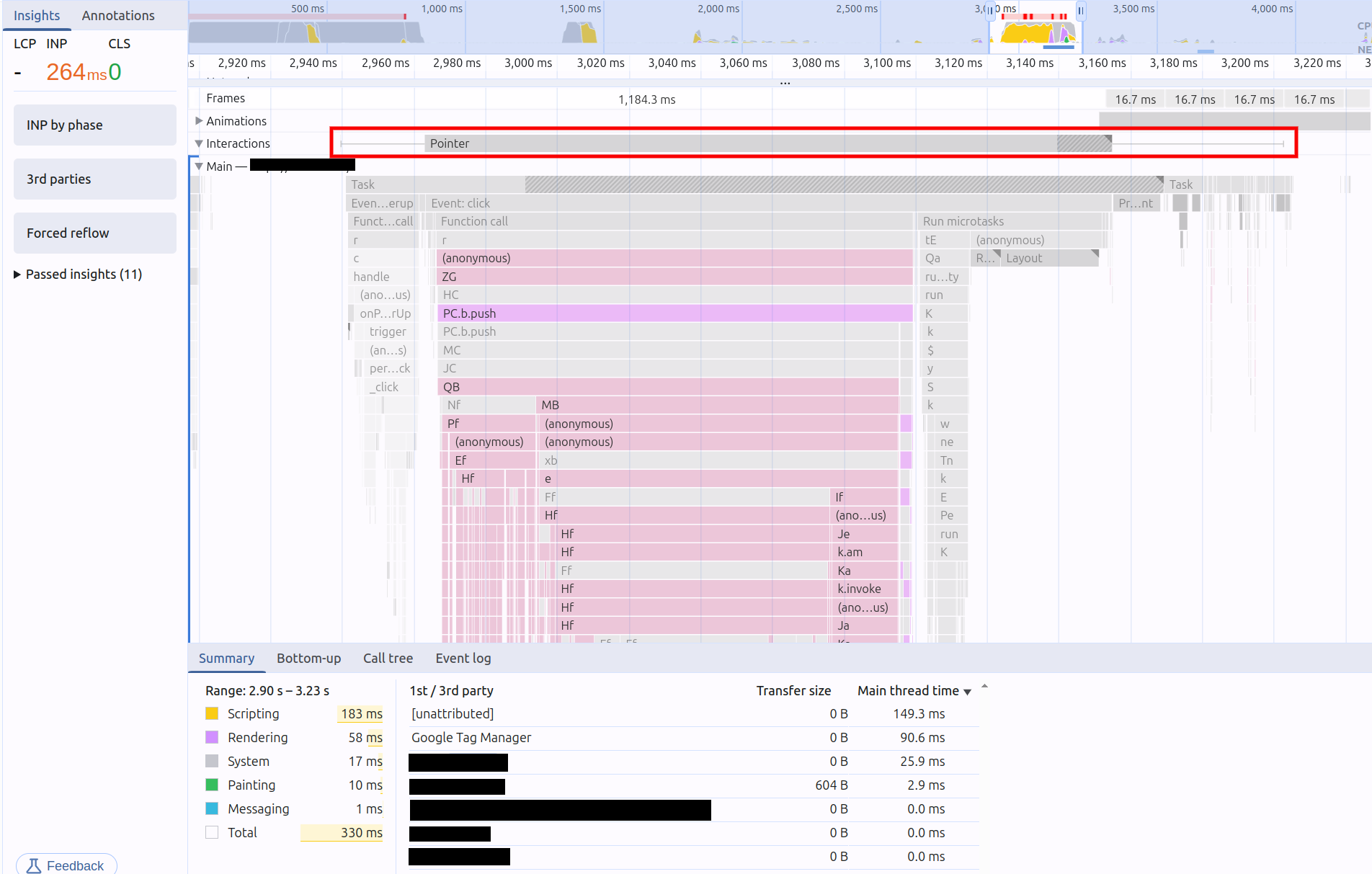
The performance trace below, from a major news website, shows GTM activity following a user interaction. The GTM tasks took approximately 90ms to execute, pushing the overall INP to 263ms. That interaction fails the Core Web Vitals.
The fix: paint first, then push
The solution aligns with web.dev's INP optimization guidance: yield to the main thread so the browser can paint before running non-critical code. Instead of executing tracking synchronously inside the event handler:
- Execute the code for the visual update immediately.
- Let the browser paint.
- Then push to the dataLayer.
Here is the same interaction after applying this pattern. The only change is that dataLayer.push() now runs after the browser has painted the next frame.
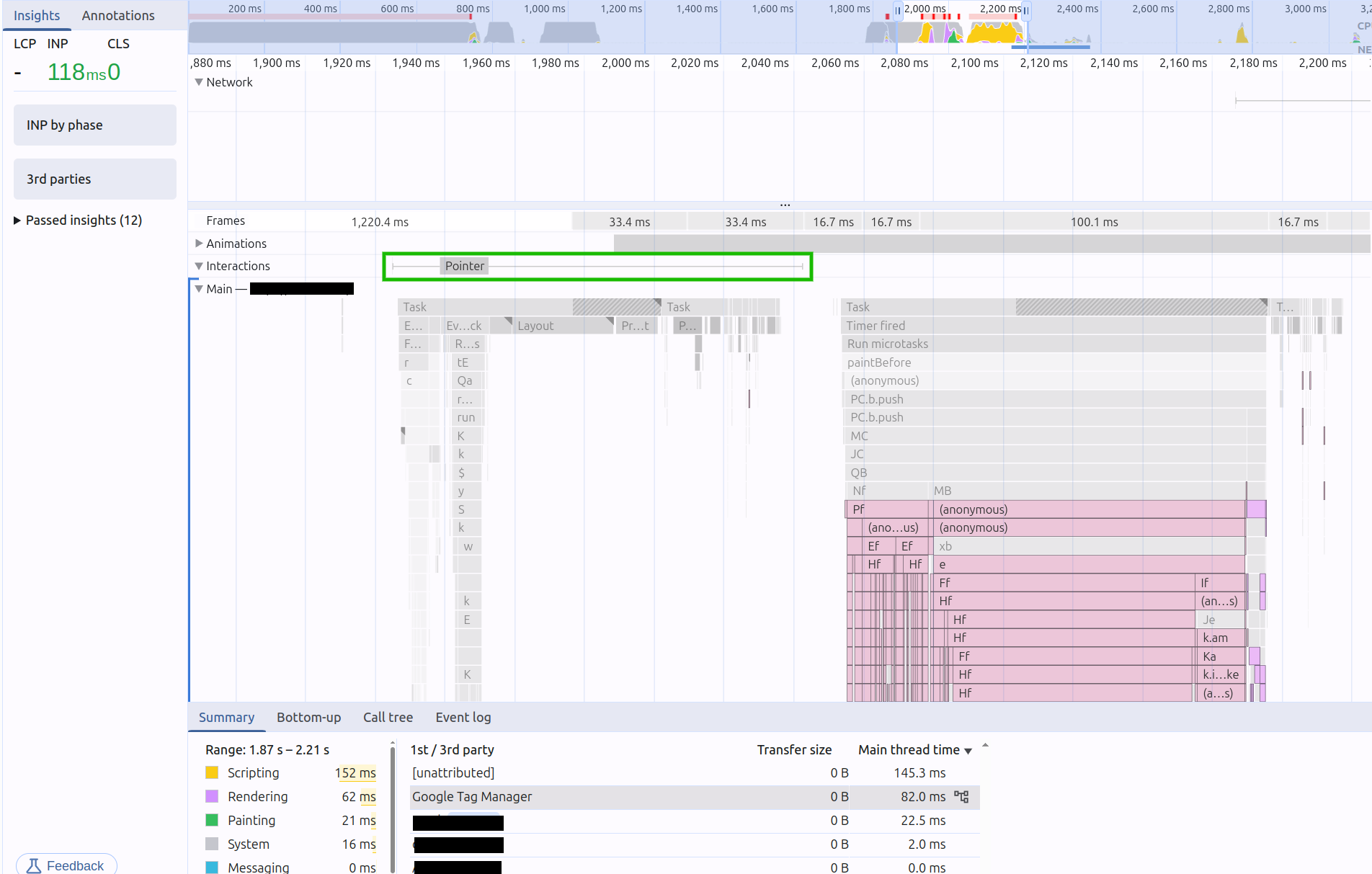
The interaction that previously failed now comfortably passes. All data still reaches the dataLayer. The difference is that GTM scripts execute after the browser has responded to the user's action, not before.
The awaitPaint helper
This helper uses requestAnimationFrame to schedule a callback after the browser has painted. The nested setTimeout ensures the function runs after the paint completes, not just before it. This is the pattern recommended by web.dev for deferring non-critical work after an interaction.
async function awaitPaint(fn) {
    await new Promise((resolve) => {
        // Fallback: ensures we don't hang if RAF never fires (e.g. background tabs)
        setTimeout(resolve, 200);

        // Schedule after the next paint
        requestAnimationFrame(() => {
            setTimeout(resolve, 50);
        });
    });

    if (typeof fn === 'function') {
        fn();
    }
}
Using the helper
Wrap any dataLayer.push() call in awaitPaint to defer it until after paint:
function pushToDataLayer(event, data) {
    window.dataLayer = window.dataLayer || [];

    awaitPaint(() => {
        window.dataLayer.push({
            event,
            ...data,
            timestamp: new Date().toISOString()
        });
    });
}

// Usage
document.querySelector('.buy-button').addEventListener('click', () => {
    // Visual feedback happens immediately
    showLoadingSpinner();

    // Tracking fires after paint
    pushToDataLayer('purchase_click', { productId: '123' });
});
Global override for quick testing
To test this pattern across your entire site without refactoring every dataLayer.push() call, you can globally override the push function. Place this script in the <head> immediately after the GTM container snippet.
<script type="module">
    window.dataLayer = window.dataLayer || [];

    async function awaitPaint(fn) {
        await new Promise((resolve) => {
            // Fallback: ensures we don't hang if RAF never fires (e.g. background tabs)
            setTimeout(resolve, 200);

            // Schedule after the next paint
            requestAnimationFrame(() => {
                setTimeout(resolve, 50);
            });
        });

        if (typeof fn === 'function') {
            fn();
        }
    }

    if (window.dataLayer && typeof window.dataLayer.push === 'function') {
        const originalPush = window.dataLayer.push.bind(window.dataLayer);

        window.dataLayer.push = function (...args) {
            awaitPaint(() => {
                originalPush(...args);
            });
        };
    }
</script>
This overrides every dataLayer.push() on the page. All existing GTM event triggers, hardcoded tracking calls, and plugin integrations automatically benefit without any code changes.
Why this improves INP
INP measures the time from a user interaction until the browser paints the visual response. If you synchronously execute GTM event processing inside an event handler, you block the main thread and prevent rendering. The 2024 Web Almanac found that presentation delay is the largest contributor to poor INP at the median, and tracking scripts are among the main causes.
The numbers confirm this. The 2025 Web Almanac shows that 77% of mobile pages pass INP overall, but only 63% of the top 1,000 most visited sites do. Those top sites load more third-party scripts. At Subito (Italy's largest classifieds marketplace), disabling a single TikTok tracking script loaded via GTM dropped INP from 208ms to roughly 170ms. One script, 38ms saved.
By deferring dataLayer.push() until after paint, you move all GTM processing out of the interaction's critical path. The user gets visual feedback immediately. GTM still fires, just 50 to 250ms later.
Why not a fixed delay, Idle Callback, or scheduler.yield()?
- Fixed
setTimeout(delay): A hardcoded delay (e.g.,setTimeout(..., 100)) is guessing when rendering will complete. Too long and you delay tracking unnecessarily. Too short and you still block paint. requestIdleCallback: Schedules work when the browser is idle, but does not guarantee execution promptly after a specific interaction. The callback might run much later, or not at all before the user navigates away.scheduler.yield(): The modern API for yielding to the main thread. It preserves task priority (unlikesetTimeoutwhich sends your continuation to the back of the queue). However,scheduler.yield()does not guarantee that a paint has occurred before your code runs. For this specific use case,requestAnimationFrameis the better tool because it is tied to the rendering lifecycle. Note thatscheduler.yield()is not yet supported in Safari.
The requestAnimationFrame + setTimeout combination is specifically designed for this scenario. requestAnimationFrame fires just before the browser paints. The nested setTimeout creates a new task that runs after that paint completes. Together they guarantee your deferred code executes after the visual update, which is exactly what INP measures.
Trade-offs
- Micro-delay in data collection: Events reach GTM 50 to 250ms later than with synchronous push. For analytics and marketing tracking, this is inconsequential.
- Quick exit data loss: If a visitor triggers an event and leaves the page within the delay window, that event may not fire. For critical events before a redirect or page unload, use
navigator.sendBeacon()instead ofdataLayer.push(). See the case for limiting analytics scripts for more on the Beacon API.
For most tracking, the gain in INP far outweighs the minimal delay. If you need millisecond precision in event logging (real-time bidding, financial dashboards), this approach is not suitable. For everything else, it is a clear win.
After applying the override, verify the improvement with Real User Monitoring. Lab tests will show the difference, but field data from real users on real networks is what counts for your Core Web Vitals scores.
Performance degrades the moment you stop watching.
I set up the monitoring, the budgets, and the processes. That is the difference between a fix and a solution.
Let's talk
