When preloading stylesheets does (not) make sense
Why preloading your CSS usually does not help, and the one case where it does

When Preloading Stylesheets Does (Not) Make Sense
I regularly encounter preloaded stylesheets and a lot of misinformation surrounding them. Preloading a resource changes when it is scheduled for download. But most of the time, preloading stylesheets does not help. In five cases I will show you when it works and when it does not.
Last reviewed by Arjen Karel on March 2026
Table of Contents!
- When Preloading Stylesheets Does (Not) Make Sense
- The idea of preloading stylesheets
- Case 1: preloading the stylesheet just before declaring it
- Case 2: preloading the stylesheet with a link header
- Case 3: 103 Early Hints for stylesheets
- Case 4: preload stylesheets to achieve asynchronous CSS
- Case 5: pre-cache stylesheets
- What actually works for CSS performance
The idea of preloading stylesheets
Stylesheets are render blocking. While stylesheets are being downloaded the page will not be rendered by the browser and all the visitor will see is a blank screen.
To minimize the time it takes to download stylesheets, developers sometimes resort to preloading them. Preloading tells the browser to fetch a resource before it discovers it in the HTML, so it is ready sooner. This is done using the <link> tag with the rel="preload" attribute.
According to the 2025 Web Almanac, only 13% of desktop pages pass the render-blocking resources audit. Preloading is not the fix. Eliminating unnecessary render-blocking resources and deferring non-critical stylesheets is.
Case 1: preloading the stylesheet just before declaring it
Sometimes developers, in all their enthusiasm, try to minimize CSS impact by preloading it in the HTML just before the actual CSS declaration. This will look something like:
<link rel="preload" as="style" href="style.css">
<link rel="stylesheet" href="style.css">
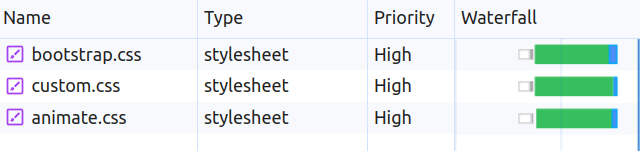
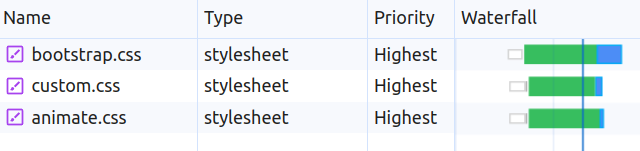
This does not make sense at all and at best you will not slow down the page. Browsers have a built-in preload scanner that scans the HTML for resources to download before the main parser reaches them. If your stylesheet <link> is already in the <head>, the preload scanner finds it immediately. Adding a rel="preload" hint for the same URL gives the browser information it already has. You just added an extra line, that is all.
3 preloaded stylesheets
3 normal stylesheets
Case 2: preloading the stylesheet with a link header
This idea is interesting. We can use the Link server header to preload a stylesheet. That would look something like this:
Link: <style.css>; rel=preload; as=style
The idea is to get the browser to enqueue the stylesheet before it starts parsing the HTML. I like how the mind of a developer who thought of this works! But in real life you will get very little benefit. We are talking about a few microseconds. Pretty disappointing results, but this idea leads us to something that actually works.
Case 3: 103 Early Hints for stylesheets
This is the only idea that will actually get you Core Web Vitals results. Sending early hints for stylesheets will improve metrics like the First Contentful Paint and the Largest Contentful Paint.
103 Early Hint headers are sent before the actual HTML response. That means that while you are downloading the HTML, the browser may also start downloading stylesheets in parallel. The best case scenario is that by the time the HTML has finished downloading, the stylesheets have downloaded as well. Zero render blocking time from those stylesheets. This can and does happen on slower networks. On faster networks the effect is less obvious, but using 103 Early Hints is still faster in almost all cases.
A 103 Early Hint response looks much the same as a preload link header. To use 103 Early Hints you will need to configure your webserver or your CDN.
HTTP/1.1 103 Early Hints
Link: </style.css>; rel=preload; as=style
Some CDNs like Cloudflare will let you trigger a 103 Early Hint by simply setting a link preload header (as described in Case 2). For a complete guide on implementation and browser support, see 103 Early Hints: Preload Critical Resources During Server Think Time.
Across sites monitored by CoreDash, pages using 103 Early Hints for their main stylesheet show a 120ms faster FCP at the 75th percentile compared to pages without Early Hints. The improvement is most visible on mobile connections where server think time and network latency overlap more.
Case 4: preload stylesheets to achieve asynchronous CSS
A well known trick to make CSS non-render-blocking is to preload the stylesheet and once it is loaded add it to the page. The idea is simple and looks like this:
<link
   rel="preload"
   href="style.css"
   as="style"
   onload="this.onload=null;this.rel='stylesheet'"
>
It is based on the normal preload code <link rel="preload" as="style" href="style.css"> and adds an onload event listener onload="this.onload=null;this.rel='stylesheet'" that changes the link to its final form <link rel="stylesheet" href="style.css">
This is another idea that just makes sense. If a stylesheet is not render blocking the browser can continue to parse and render the page without waiting for the stylesheet. However, be careful!
- Do not async CSS in the visible viewport. This will likely cause a Cumulative Layout Shift and that will lead to a poor user experience.
- Consider the trade-off. Async CSS will likely cause a re-render of different parts of the page. This will impact metrics like the Interaction to Next Paint.
A simpler modern alternative is to use fetchpriority="low" on a regular stylesheet link: <link rel="stylesheet" href="style.css" fetchpriority="low">. This tells the browser to deprioritize the download without the JavaScript hack. I recommend this over the onload trick for most use cases.
Case 5: pre-cache stylesheets
On rare occasions I see nifty solutions that try to pre-warm cache files for subsequent pageviews. And while I applaud the enthusiasm with which those solutions are made: please do NOT do this.
The idea is simple: on the homepage you could, if you wanted to, already pre-cache the styles for another page. Let's say the product page. At some point after page load you would preload stylesheets to add them to the browser cache.
function preloadStylesheet(url) {
    var link = document.createElement('link');
    link.rel = 'preload';
    link.href = url;
    link.as = 'style';
    document.head.appendChild(link);
}

window.addEventListener('load', function () {
    preloadStylesheet('cart.css');
    preloadStylesheet('shop.css');
});
At first glance this does not look half bad. On any product page cart.css and shop.css are now available and will not block render anymore. There are a few reasons not to do this:
- There are better ways, for example speculative prerendering with Speculation Rules or by using a service worker.
- You will probably waste resources and the trade off will not be worth it. If preloading resources was easy, browsers would have been better at it.
- Solutions like this are hard to maintain and will probably cause issues at some point in the future.
- You will need to preload all stylesheets, not just a few. Because all stylesheets are render blocking and downloaded in parallel, just one stylesheet can have the same effect as multiple stylesheets.
What actually works for CSS performance
Instead of reaching for preload hints, focus on these resource prioritization fundamentals:
- Remove unused and redundant CSS. Smaller files download faster. This is the single biggest win for most sites.
- Use 103 Early Hints for your critical stylesheets if your server or CDN supports it.
In our Real User Monitoring data, sites that remove redundant CSS and use 103 Early Hints consistently pass LCP at the 75th percentile. Sites that only preload their stylesheets without addressing the root cause (too much CSS, loaded too late) rarely see meaningful improvement.
Your Lighthouse score is not the full picture.
Your real users are on Android phones over 4G. I analyze what they actually experience.
Analyze field data
