Forced reflow in Lighthouse: what it means and the fix
A script that changes the page and then asks for a size makes the browser redo the layout right away. When that makes taps hang, and when it is harmless.

What does Forced reflow mean in Lighthouse?
A forced reflow means a script changed your page and then asked for a size, so the browser had to recalculate the layout right away. Lighthouse lists those scripts in the Forced reflow insight ("A forced reflow occurs when JavaScript queries geometric properties"). Once is normal; in a loop it makes taps hang. Let CSS do the script's work, or read every size before you change anything.
Table of Contents!
What does the Forced reflow notice list?
Lighthouse 13 and PageSpeed Insights describe it as: "A forced reflow occurs when JavaScript queries geometric properties (such as offsetWidth) after styles have been invalidated by a change to the DOM state. This can result in poor performance. Learn more about forced reflows and possible mitigations." It turns red when scripts force 30 ms or more of layout work in one go during the page load.
The report below comes from a cabin listing page I built like a WordPress holiday-rental site, whose theme script cuts every description to three lines and makes all cards equally tall.
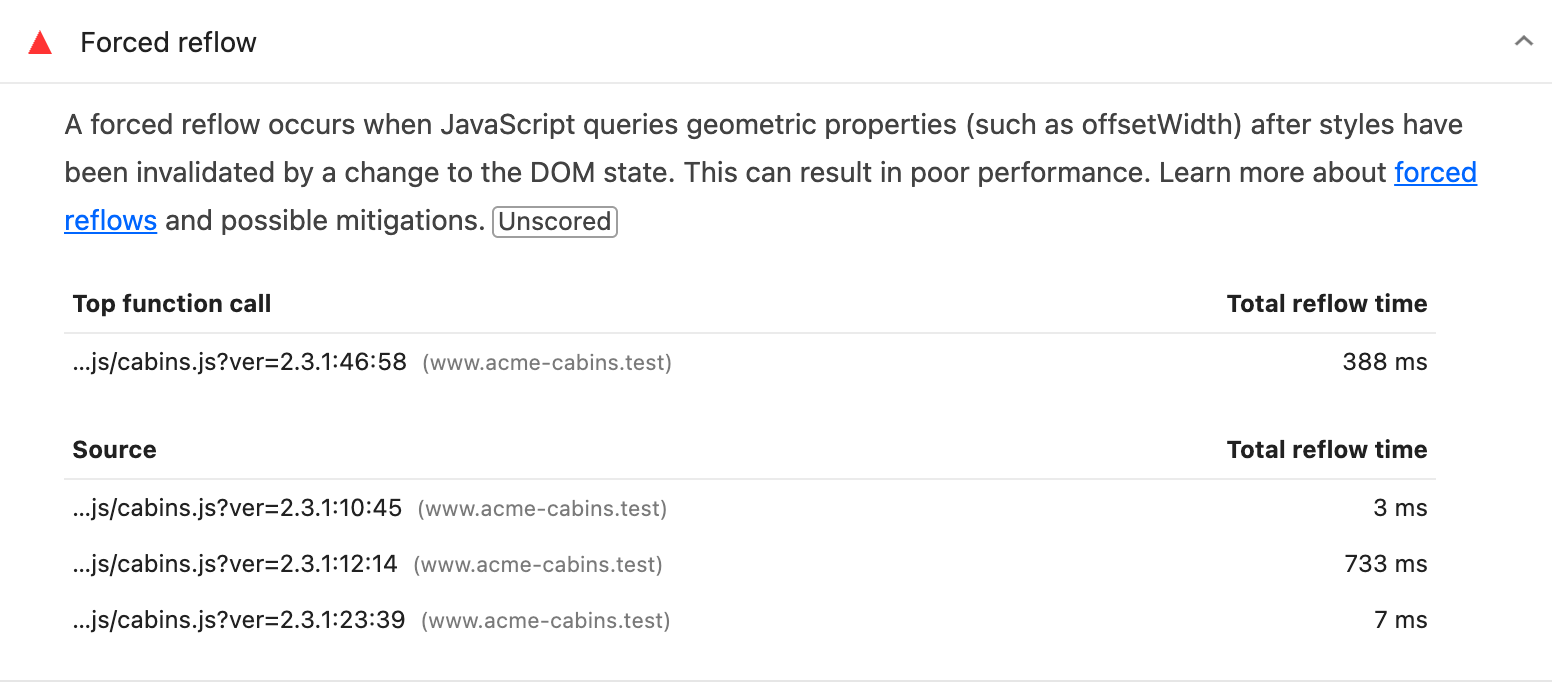
Lighthouse 13.5 on mobile, DevTools throttling (Slow 4G, 4x CPU).
- Top function call: the outer function that started the layout work. Hover its shortened file path for the full one, which names the theme, plugin or app. A file on another domain is usually a third-party tag, such as a session recorder (Scripts you can't change).
- Source: each line of code that asked for a size.
- Total reflow time: the layout time that function or line caused.
- Unscored: the insight has no weight in your Performance score. The long tasks behind it (stretches over 50 ms in which the page can't respond) lower the score through Total Blocking Time.
The top row (388 ms) is lower than the Source rows together (743 ms) because the cabin script runs twice during the load, and the top row shows only the bigger run.
Why does a script force the browser to redo the layout?
On the cabin listing from above, a tap on the "All" filter freezes the page for a third of a second before the 48 cards appear.
Layout is the step where the browser works out where every box goes and how big it is. It normally does that once per frame, after the scripts have run. When a script changes the page (a text, a class, a height) and then reads a size, such as offsetHeight, getBoundingClientRect(), scrollTop or getComputedStyle(), the browser has to do the layout right away, inside the script, to answer. Paul Irish keeps the full list of the reads that force it.
A single forced reflow is mostly layout the browser would have done a moment later. In a loop that changes and reads again, it is a full layout every round: layout thrashing. The cabin theme cuts each description like this:
while (el.offsetHeight > max && words.length > 1) {
  words.pop();
  el.textContent = words.join(' ') + '…';
}
Each word it removes changes the text, so the next offsetHeight read forces a new layout: one per word, on every card.
How much slower does a forced reflow make a page?
I measured the cabin listing with the theme script (Before) and with CSS cutting the text and making the cards equally tall (After). Both versions look the same.
| Before | After | |
|---|---|---|
| Lighthouse score | 84 | 92 |
| Total Blocking Time | 360 ms | 0 ms |
| Total reflow time | 743 ms | none |
| A tap on "All" | 320 ms | 16 ms |
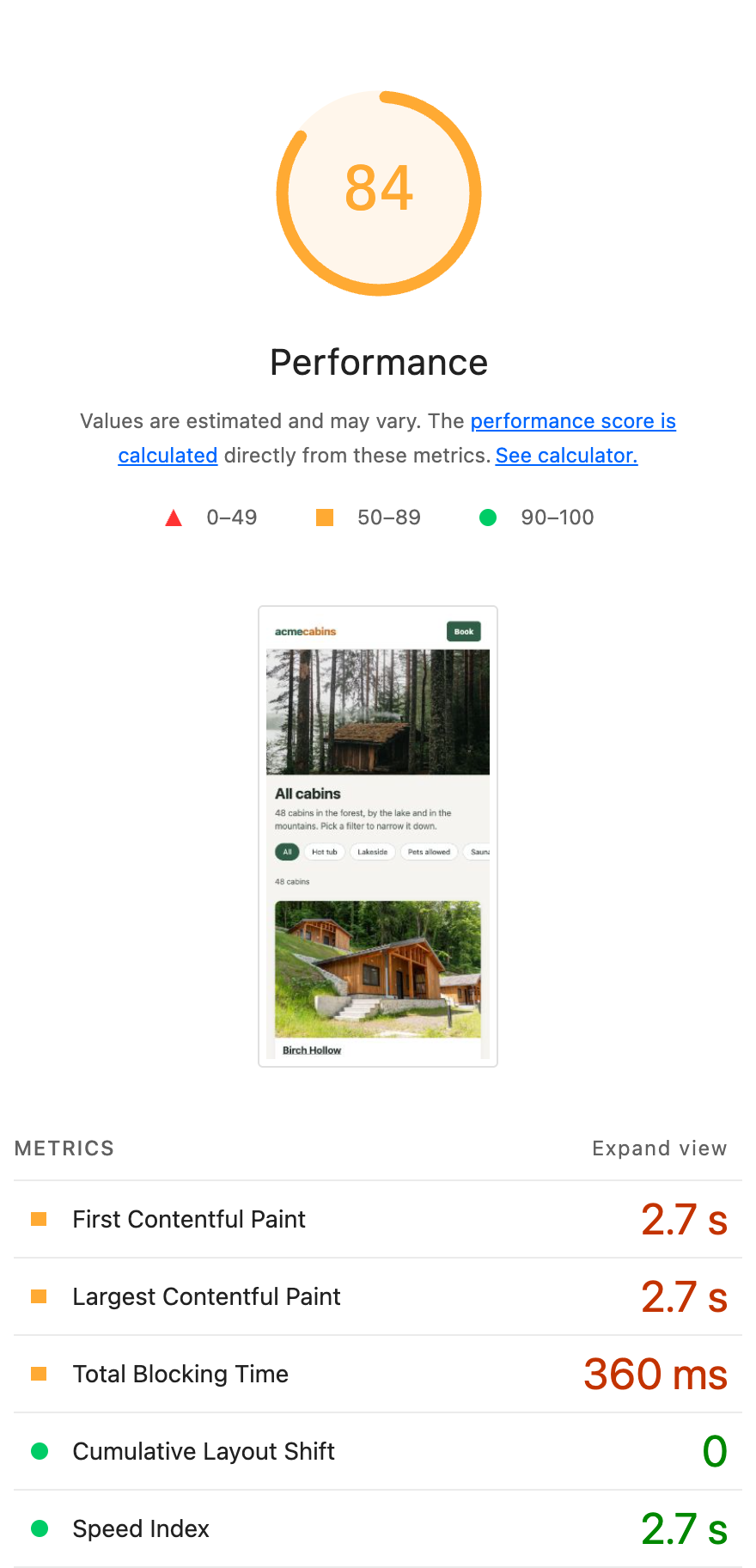
Before
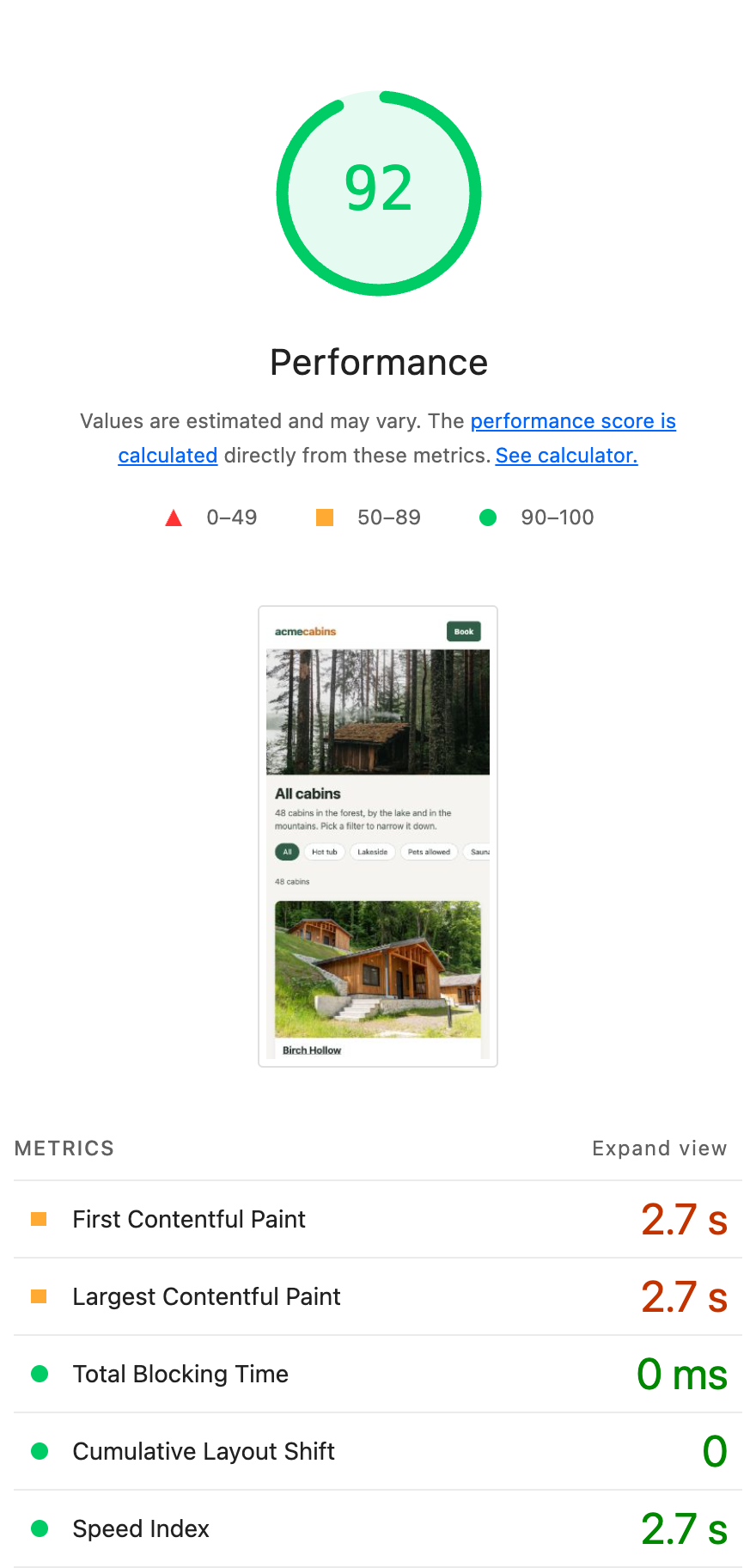
After
Lighthouse 13.5 on mobile, DevTools throttling.
The 8 points come from Total Blocking Time: the forced layouts keep the page blocked longer. The tap is what your visitor feels, and it counts toward INP (Interaction to Next Paint), the Core Web Vital for how fast a page responds to taps and clicks. 320 ms is over the 200 ms limit for a good INP, and 298 ms of it was layout the script forced; 16 ms is a single frame. Lighthouse never taps, so I measured the taps in Chrome with the CPU slowed to phone speed.
When is a forced reflow harmless?
- One small row during the load. A row just over 30 ms is often the page's first layout, done a little early because a script asked for a size. The cabin listing's theme script, rewritten to read all heights first, showed one row of 37 ms in one of four Lighthouse runs, and the tap on "All" took 16 ms.
- A row "[unattributed]". It names no line of code: run Lighthouse again, and if the row is gone, leave it.
- A script that starts an animation. Bootstrap's modals and some popup plugins read a size on purpose, so their CSS transition starts.
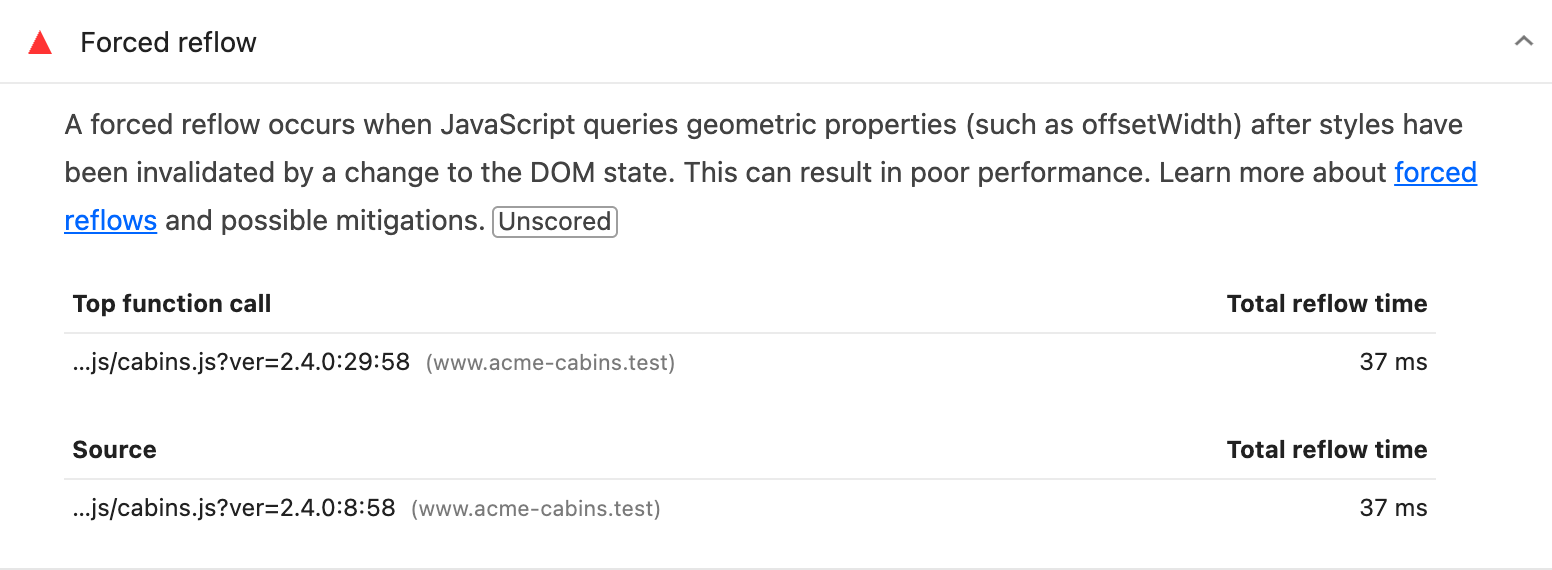
Lighthouse 13.5 on mobile, DevTools throttling.
Fix it when the total reflow time is in the hundreds of milliseconds, when one file has many rows, or when the script also runs on taps: a filter, a menu, a slider.
Which script causes the forced reflow on a tap?
Lighthouse only loads the page, so record the taps that hang in the Performance panel:
- Open DevTools (F12), go to Performance and set the CPU to 4x slowdown, so your laptop behaves like a phone.
- Click Record, tap what feels slow and stop the recording.
- Open Forced reflow in the Insights sidebar. "Call frames that trigger reflow" names the function and the line.
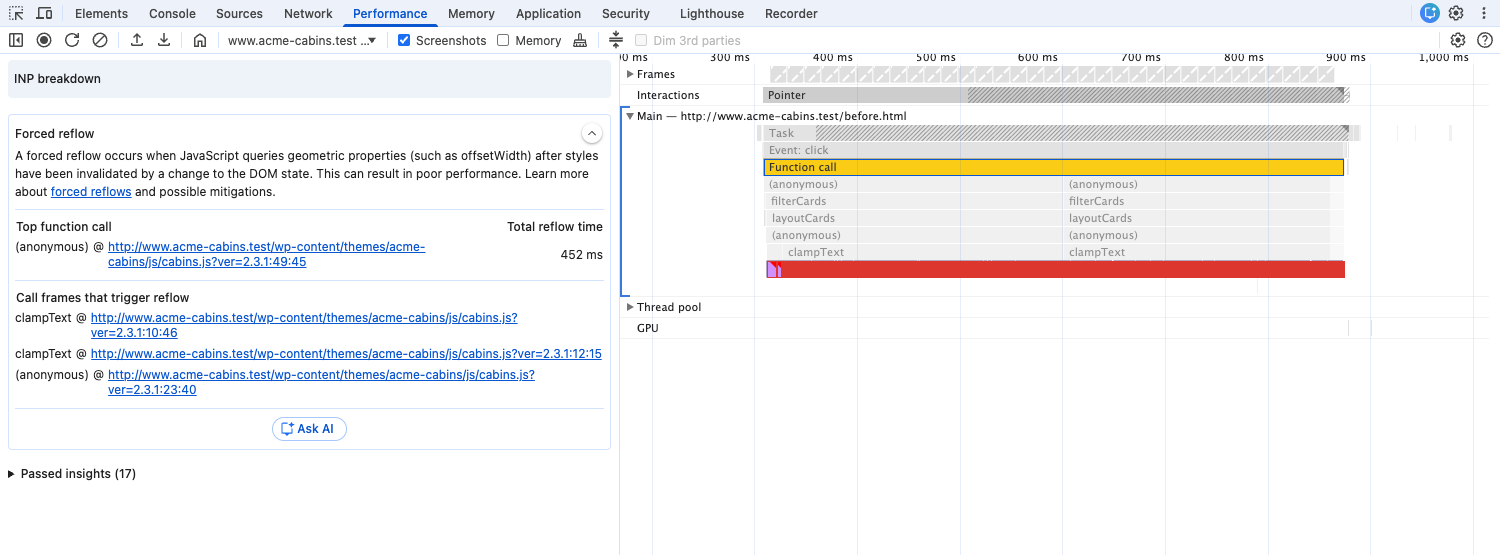
One tap on "All" on the cabin listing: clampText in cabins.js.
The console reports the same thing as "[Violation] Forced reflow while executing JavaScript took 38ms", once you turn on Verbose in its log levels.
When Lighthouse only names jquery.min.js, jQuery did the reading for a theme or plugin. Record a reload in the Performance panel and click a Layout block with a red triangle: under Function stack in the Summary, the file between jQuery's lines, with a path such as /wp-content/plugins/<name>/, is the plugin.
Your field data holds the taps and clicks of your real visitors. In CoreDash, open INP, Breakdown and group by LOAF: Chrome records which scripts ran in each slow frame (Long Animation Frames), so every row is a script with the INP of the interactions it ran in. A forced reflow in a click or tap handler counts as processing, the purple part of each bar, so start with a slow script whose purple part is long.
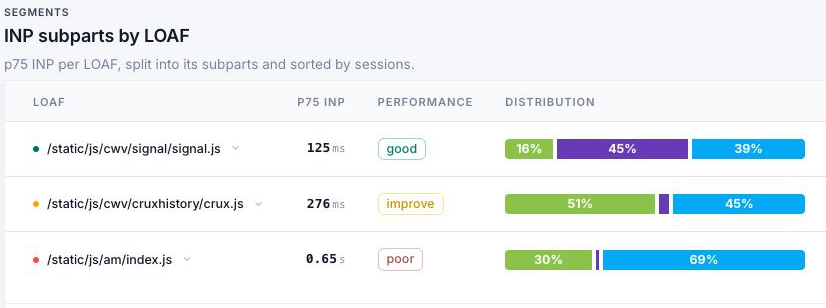
INP per script in CoreDash, desktop, p75: green is input delay, purple processing, blue presentation.
How do you fix a forced reflow?
Start with the file in Top function call and ask whether CSS can do that script's job. Text cut to three lines (line-clamp), cards of equal height (grid), a header that stays on top (position: sticky) and an image box that keeps its shape (aspect-ratio) need no script, and without the script nothing forces a layout.
After any fix below, record the same tap again: Forced reflow should be gone from the Insights sidebar. Then check it in Lighthouse and in your field data; Search Console takes up to 28 days.
WordPress themes, plugins and page builders
The path in Top function call names the theme (/wp-content/themes/) or the plugin (/wp-content/plugins/). Look for a setting first. Elementor's "Stretch Section" widens a section with JavaScript on every load and resize; the Elementor Full Width page layout with a full-width container does it in CSS. A Swiper slider set to "auto" slides per view measures every slide; with a fixed number it computes the widths without reading them.
Delaying JavaScript in WP Rocket or a similar plugin clears the notice, but the script then runs on the visitor's first tap or scroll, with the same forced layouts. Fix the script instead, or report it to the plugin's developer and replace the plugin if nothing changes.
When the theme cuts text with JavaScript, cut it with CSS in your child theme, with your theme's class for the text:
.cabin .desc {
  display: -webkit-box;
  -webkit-box-orient: vertical;
  -webkit-line-clamp: 3;
  line-clamp: 3;
  overflow: hidden;
}
Then switch off the theme's clamp script: a theme option, or wp_dequeue_script() with its handle.
Shopify themes and apps
In the theme editor, under App embeds, switch the apps off one at a time and run Lighthouse again. When the notice goes away, report that app to its developer, or replace it. A path with /assets/ in Top function call is a theme file, from the theme itself or from an app that added code to it. Dawn and the themes built on it mostly read a size once and batch their changes, so look at the apps first.
Your own JavaScript and React
Where a script has to measure, read all sizes first and change things after, so one layout answers every read. An accordion that sets each panel to its own height:
const panels = [...document.querySelectorAll('.panel')];

// A layout for every panel: read, write, read, write
panels.forEach(p => { p.style.maxHeight = p.scrollHeight + 'px'; });

// One layout: read every height, then write them all
const heights = panels.map(p => p.scrollHeight);
panels.forEach((p, i) => { p.style.maxHeight = heights[i] + 'px'; });
- Resize and scroll: ResizeObserver and IntersectionObserver give you the sizes from the layout the browser has just done. Use them instead of reading sizes in a resize or scroll handler.
- React: measure once in
useLayoutEffectand set state once. Mount menus, popovers and tooltips when they open, so closed ones measure nothing during the load.
Scripts you can't change
Session recorders and heatmap tags read sizes on purpose: Microsoft Clarity reads a dozen page sizes when it starts and the position of everything a visitor clicks. Remove the tag, record a sample of visits, or load it only on the pages you are studying.
Forced reflow in a plugin or app you can't replace, or taps that hang on your visitors' phones and not on yours? In a Core Web Vitals power hour we find the script behind your slowest taps and decide together whether to fix, replace or remove it.
Find out what is actually slow.
I map your critical rendering path using real field data. You get a prioritized fix list, not a Lighthouse report.
Get the audit
