Defer HubSpot Forms: Fix Render Blocking Without Editing Pages
A drop-in fix for render-blocking HubSpot form scripts

'Defer HubSpot forms' in short
HubSpot forms are a great way to integrate forms directly into your HubSpot CRM. In HubSpot you can easily create forms and place them directly into your website with some JavaScript code.
Last reviewed by Arjen Karel on March 2026
There is just one small issue. HubSpot does not like the Core Web Vitals and the HubSpot form will slow down your website.
HubSpot forms are render blocking by default. The form script (v2.js) is roughly 521 KB uncompressed. That is almost the entire median JavaScript payload of a mobile page according to the 2025 Web Almanac (646 KB). All of that, just for one form.
Fixing the PageSpeed will require a rewrite for each page a HubSpot form appears on. Sometimes that is not an immediate option. I have created a drop-in replacement to speed up your forms without having to change any page-level code.

HubSpot form code, the slow method
The default HubSpot code for placing forms on a website will look like this:
<script
   type="text/javascript"
   src="//js.hsforms.net/forms/v2.js">
</script>

<script>
  hbspt.forms.create({
    portalId: '123456',
    formId: '123456'
  });
</script>
This will result in a Lighthouse warning 'Eliminate render blocking resources'. The HubSpot form blocks the rendering of the page for a full second. According to the 2025 Web Almanac, 87% of pages still serve render-blocking resources. HubSpot's default embed is one of the worst offenders because it loads synchronously with no defer or async attribute.
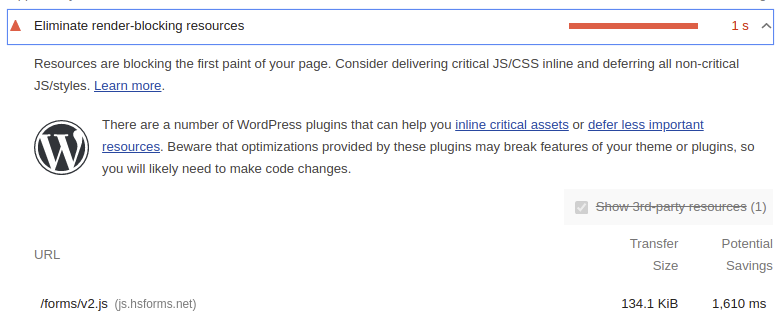
Your first idea might be to defer the HubSpot script. This won't work and will throw an error because hbspt.forms.create() expects the HubSpot script to be loaded. Let's fix this!
HubSpot form code, the fast fix
Sometimes there is just no time to sift through hundreds of pages and rewrite the code for each HubSpot form. That is why I have created a drop-in replacement for faster, non-render-blocking HubSpot forms:
The idea is simple. Forms are called by calling hbspt.forms.create. Let's catch the forms, wait until the HubSpot code loads in the background and then execute the form script.
<script>
// cache hubspot forms here
var hubcache = {
    forms: [],
    letsgo: function() {
        for (var i = 0; i < hubcache.forms.length; i++) {
            // hubspot is now loaded, use the real hbspt
            hbspt.forms.create(hubcache.forms[i]);
        }
    }
};

// override hbspt while hubspot is loading
var hbspt = {
    forms: {
        create: function(c) { hubcache.forms.push(c); }
    }
};
</script>
<script
   type="text/javascript"
   defer
   src="//js.hsforms.net/forms/v2.js"
   onload="hubcache.letsgo()">
</script>
Don't forget to reserve some space for the form since it does not block the rendering anymore and will cause a larger layout shift than if you previously forgot to reserve some space. Set a min-height on the form container that matches the rendered form height.
Alternative: the hsFormsOnReady pattern
HubSpot's v2.js also supports an undocumented callback queue called hsFormsOnReady. If you control the embed code directly, this is a cleaner option:
<script defer src="//js.hsforms.net/forms/v2.js"></script>
<script>
  (window.hsFormsOnReady = window.hsFormsOnReady || []).push(function() {
    hbspt.forms.create({
      portalId: '123456',
      formId: '123456'
    });
  });
</script>
The drop-in hack above is the better approach when you cannot change the existing embed code on every page. The hsFormsOnReady pattern requires editing each form's embed snippet individually.
HubSpot form code, the correct way
I am not a huge fan of implementing hacks like this (although I do like writing them). Sometimes they are necessary because there just is not enough time available to rewrite a website. Therefore always take PageSpeed into consideration before committing to an external app/plugin etc that might cause all sorts of issues. If you are unsure about the PageSpeed implications just ask someone like me. We know :-)
The correct way is to use the HubSpot Forms API directly. Build your own HTML form, style it however you want, and submit the data to HubSpot with a simple POST request:
fetch(
  'https://api.hsforms.com/submissions/v3/integration/submit/PORTAL_ID/FORM_ID',
  {
    method: 'POST',
    headers: { 'Content-Type': 'application/json' },
    body: JSON.stringify({
      fields: [
        { name: 'email', value: email },
        { name: 'firstname', value: firstName }
      ]
    })
  }
);
Zero JavaScript from HubSpot. Zero render blocking. Full CRM integration. The form still appears in your HubSpot dashboard, triggers workflows, and feeds your contact database. You just do not need 521 KB of HubSpot code to submit a few fields.
To confirm your fix actually works for real visitors, set up Real User Monitoring. Lab scores tell you the form is no longer blocking, but field data tells you whether your INP and LCP actually improved.
Your Lighthouse score is not the full picture.
Your real users are on Android phones over 4G. I analyze what they actually experience.
Analyze field data
